How to Enrich a Company from a Domain: AI Workflow Inside
A practical AI workflow for enriching a company from a domain — fetch with Firecrawl, extract with OpenAI structured outputs, validate, and decide when to use a company enrichment API instead.
Summarize this blog post with
 ChatGPT
 Perplexity
 Claude
 Grok
Grok Google AI
If you are trying to learn how to enrich a company from a domain, the workflow is simpler than most teams expect: fetch the company website, extract structured fields with an LLM, validate the output, and decide when a dedicated enrichment API makes more sense than a custom pipeline.
At CompanyEnrich, we spend a lot of time thinking about this exact problem. Company enrichment looks easy when the input is one clean domain like stripe.com. It gets harder when the next record is a parked domain, the next site hides its address on a contact page, and the next homepage is a JavaScript app with no useful HTML in the first response.
This guide walks through a practical AI workflow in Python. We will use Firecrawl to fetch site content and OpenAI structured outputs to extract a company profile as JSON. You will get a working implementation, a production checklist, and a clear build-vs-buy framework for deciding when to use a company enrichment API instead.
What This Guide Covers
Inside, you will learn:
- What company enrichment from domain means in practice
- How to enrich a company from a domain with an AI workflow
- How to fetch the homepage, contact page, about page, and footer links
- How to extract name, description, industry, socials, phone, email, and address
- How to validate LLM output so the model does not invent plausible data
- How DIY enrichment compares with the CompanyEnrich API at production volume
What does it mean to enrich a company from a domain?
Company enrichment from domain is the process of taking a domain like companyenrich.com and returning a structured company profile. A useful output usually includes the company name, description, industry, headquarters, social profiles, contact details, employee range, revenue range, technologies, and other firmographic fields.
The reason domains are so useful is that they appear everywhere. You see them in signup forms, CRM records, email addresses, enrichment queues, warehouse tables, and agent workflows. A domain is often the most reliable company identifier you have before you know anything else.
The simplest enrichment flow looks like this:
- Normalize the domain into a URL.
- Fetch the website content.
- Extract structured company fields.
- Validate the extracted values.
- Store the final JSON record.
That sounds straightforward. The details are where the work lives.
According to Gartner, poor data quality costs organizations at least $12.9 million per year on average. In B2B systems, company data quality problems usually show up as duplicate accounts, bad routing, wrong territories, incomplete lead scores, and agents making decisions on stale or missing records.
Domain enrichment is one of the highest-leverage places to fix that. One domain can turn into a clean company identity, a routing decision, a qualification score, or an API response inside an AI agent.
How to enrich a company from a domain with AI
The AI version of the workflow has four stages: fetch, extract, enrich, and validate.
Fetch. Start with the domain and retrieve readable page content. For enrichment, the homepage alone is often not enough. Social links, phone numbers, and physical addresses usually live in the footer, contact page, about page, or location page.
Extract. Send the page content to an LLM with a strict JSON schema. The model reads the content and returns a company profile in the shape you define.
Enrich. Add fields that are useful downstream: LinkedIn, X, Facebook, Instagram, YouTube, phone, email, headquarters, industry, founded year, and a short description.
Validate. Treat the LLM response as a draft. Check social URLs, phone formats, email formats, and whether fields are grounded in the fetched content. Anything suspicious becomes null.
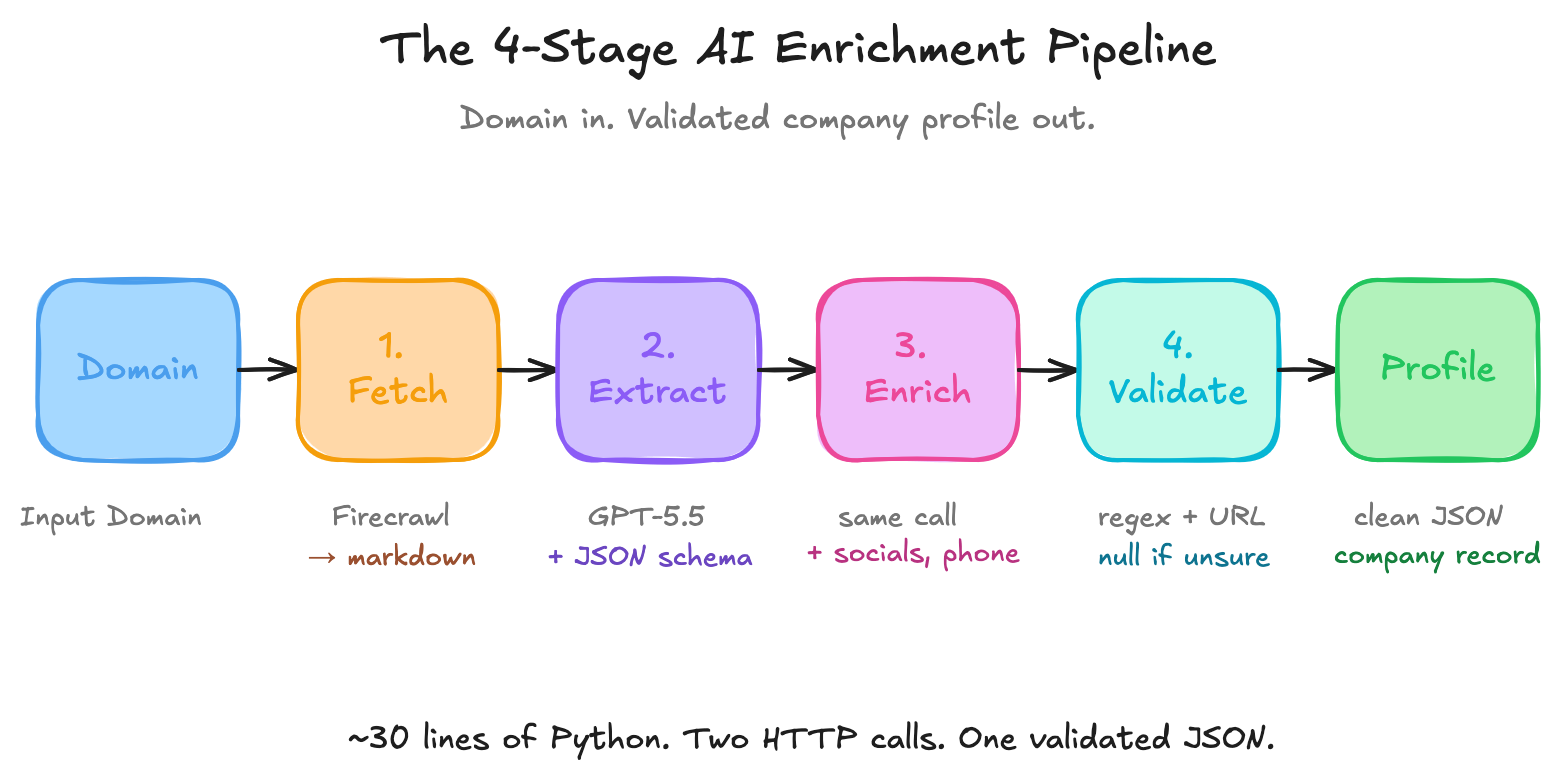
Here is the part most teams learn the hard way: the model is rarely the only problem. The hard parts are page discovery, missing data, validation, retries, cost control, and deciding which fields should be inferred versus explicitly observed.
When we build enrichment systems at CompanyEnrich, the strongest pipelines are not the ones with the longest prompts. They are the ones that make it cheap for the model to be honest. If the page does not show a phone number, the right answer is null, not a guessed phone number that happens to match the country.
What pages should you fetch before extracting company data?
For a demo, you can fetch only the homepage. For a production-quality company enrichment from domain workflow, fetch a small set of likely pages.
| Page type | Why it matters | Fields it often contains | Fetch priority |
|---|---|---|---|
| Homepage | Best source for company identity and positioning | Name, description, industry, product category | High |
| Footer links | Best source for social profiles | LinkedIn, X, Facebook, Instagram, YouTube | High |
| About page | Best source for company story | Long description, founded year, headquarters hints | Medium |
| Contact page | Best source for direct contact data | Phone, email, address, locations | High |
| Locations page | Best source for multi-office companies | Full address, city, country | Medium |
| Careers page | Useful for validation and company activity | Company size hints, operating regions | Low |
Firecrawl's scrape API can return markdown and links from a page. Its docs note that onlyMainContent defaults to true, which removes headers, navs, and footers before markdown generation. That is useful for article extraction, but it is usually wrong for enrichment because the footer is exactly where social links and contact details live.
For enrichment, set onlyMainContent to False.
Step-by-step: How to enrich a company from a domain in Python
The implementation below uses plain HTTP with requests. No SDKs. That makes the workflow portable to Node, Go, Ruby, n8n, or any stack that can send HTTP requests.
You will need:
- A Firecrawl API key
- An OpenAI API key
- Python with
requests
pip install requestsimport json
import os
import re
from urllib.parse import urljoin, urlparse
import requests
FIRECRAWL_API_KEY = os.environ["FIRECRAWL_API_KEY"]
OPENAI_API_KEY = os.environ["OPENAI_API_KEY"]
OPENAI_MODEL = os.environ.get("OPENAI_MODEL", "gpt-5.5")
MAX_CHARS_PER_PAGE = 12000
SUPPORTING_PAGE_LIMIT = 3Step 1: Normalize the domain
User data is messy. Some inputs arrive as companyenrich.com, some as https://companyenrich.com, and some as www.companyenrich.com/.
Normalize before fetching.
def normalize_domain_to_url(value: str) -> str:
    value = value.strip()
    if not value.startswith(("http://", "https://")):
        value = "https://" + value

    parsed = urlparse(value)
    return f"{parsed.scheme}://{parsed.netloc}".rstrip("/")
Step 2: Scrape the homepage and collect links
Ask Firecrawl for both markdown and links. Keep onlyMainContent disabled so the footer stays in the markdown.
def scrape_url(url: str) -> dict:
    response = requests.post(
        "https://api.firecrawl.dev/v1/scrape",
        headers={
            "Authorization": f"Bearer {FIRECRAWL_API_KEY}",
            "Content-Type": "application/json",
        },
        json={
            "url": url,
            "formats": ["markdown", "links"],
            "onlyMainContent": False,
            "removeBase64Images": True,
            "blockAds": True,
        },
        timeout=60,
    )
    response.raise_for_status()
    return response.json()["data"]
The links output lets you find likely supporting pages. We only want same-domain pages and we only need a few.
def discover_supporting_urls(home_url: str, links: list[str]) -> list[str]:
    home_host = urlparse(home_url).netloc.replace("www.", "")
    keywords = (
        "/about",
        "/company",
        "/contact",
        "/locations",
        "/location",
        "/team",
    )

    candidates = []
    for link in links or []:
        href = link if isinstance(link, str) else link.get("href") or link.get("url")
        if not href:
            continue

        absolute = urljoin(home_url, href)
        parsed = urlparse(absolute)
        host = parsed.netloc.replace("www.", "")
        path = parsed.path.lower()

        if host == home_host and any(keyword in path for keyword in keywords):
            candidates.append(absolute.split("#")[0])

    return list(dict.fromkeys(candidates))[:SUPPORTING_PAGE_LIMIT]
Step 3: Build the extraction context
This function fetches the homepage, finds useful supporting pages, scrapes them, and creates one text payload for the model.
def fetch_company_pages(domain: str) -> str:
    home_url = normalize_domain_to_url(domain)
    pages = []

    home_data = scrape_url(home_url)
    pages.append((home_url, home_data.get("markdown", "")))

    for url in discover_supporting_urls(home_url, home_data.get("links", [])):
        try:
            page_data = scrape_url(url)
            pages.append((url, page_data.get("markdown", "")))
        except requests.RequestException:
            continue

    sections = []
    for url, markdown in pages:
        trimmed = (markdown or "")[:MAX_CHARS_PER_PAGE]
        sections.append(f"URL: {url}\n\n{trimmed}")

    return "\n\n---\n\n".join(sections)
This is the first major improvement over a homepage-only demo. You will still miss some phone numbers and addresses, but you will miss fewer of them.
What data can you enrich from a company domain?
The right schema depends on your use case. A sales routing workflow needs different fields than an internal agent or a product onboarding flow.
This schema is a practical starting point:
COMPANY_SCHEMA = {
    "type": "object",
    "properties": {
        "name": {"type": ["string", "null"]},
        "domain": {"type": ["string", "null"]},
        "description": {"type": ["string", "null"]},
        "long_description": {"type": ["string", "null"]},
        "industry": {"type": ["string", "null"]},
        "founded_year": {"type": ["integer", "null"]},
        "headquarters": {
            "type": "object",
            "properties": {
                "city": {"type": ["string", "null"]},
                "country": {"type": ["string", "null"]},
                "full_address": {"type": ["string", "null"]},
            },
            "required": ["city", "country", "full_address"],
            "additionalProperties": False,
        },
        "phone": {"type": ["string", "null"]},
        "email": {"type": ["string", "null"]},
        "social_profiles": {
            "type": "object",
            "properties": {
                "linkedin": {"type": ["string", "null"]},
                "x": {"type": ["string", "null"]},
                "facebook": {"type": ["string", "null"]},
                "instagram": {"type": ["string", "null"]},
                "youtube": {"type": ["string", "null"]},
            },
            "required": ["linkedin", "x", "facebook", "instagram", "youtube"],
            "additionalProperties": False,
        },
        "evidence_urls": {
            "type": "array",
            "items": {"type": "string"},
        },
    },
    "required": [
        "name",
        "domain",
        "description",
        "long_description",
        "industry",
        "founded_year",
        "headquarters",
        "phone",
        "email",
        "social_profiles",
        "evidence_urls",
    ],
    "additionalProperties": False,
}
Notice the nullable strings. This matters.
If your prompt says "return null when the page does not include the field," but the schema says "name": {"type": "string"}, the model has a conflict. It has to return a string, even when the field is missing. For enrichment, nullable fields are a feature, not a compromise.
How do you extract company data with an LLM?
Now send the combined page content to OpenAI with structured outputs.
OpenAI's documentation describes Structured Outputs as a way to make model responses adhere to a JSON schema. GPT-5.5 supports structured outputs on both v1/chat/completions and v1/responses, according to the OpenAI model comparison page. The example below uses Chat Completions because the raw HTTP shape is familiar to many developers.
def extract_company_profile(page_content: str) -> dict:
    response = requests.post(
        "https://api.openai.com/v1/chat/completions",
        headers={
            "Authorization": f"Bearer {OPENAI_API_KEY}",
            "Content-Type": "application/json",
        },
        json={
            "model": OPENAI_MODEL,
            "messages": [
                {
                    "role": "system",
                    "content": (
                        "Extract structured company data from the provided website pages. "
                        "Use null when a field is not explicitly visible in the provided content. "
                        "Do not guess phone numbers, email addresses, physical addresses, or social URLs. "
                        "Only include evidence_urls that appear in the input."
                    ),
                },
                {"role": "user", "content": page_content},
            ],
            "response_format": {
                "type": "json_schema",
                "json_schema": {
                    "name": "company_profile",
                    "strict": True,
                    "schema": COMPANY_SCHEMA,
                },
            },
        },
        timeout=120,
    )
    response.raise_for_status()

    message = response.json()["choices"][0]["message"]
    if message.get("refusal"):
        raise ValueError(f"Model refused extraction: {message['refusal']}")

    return json.loads(message["content"])
Structured outputs reduce parsing failures, but they do not remove the need for validation. They enforce the response shape. They do not prove that every value is true.
How do you validate socials, phone, email, and address?
Validation is where an AI demo becomes a real enrichment workflow.
Start with cheap checks. Does the phone number look like a phone number? Does the email look like an email? Does the LinkedIn URL point to a company page rather than a personal profile? Is the X URL actually on x.com or twitter.com?
PHONE_RE = re.compile(r"^\+?[0-9][0-9\s().-]{6,}$")
EMAIL_RE = re.compile(r"^[^@\s]+@[^@\s]+\.[^@\s]+$")


def valid_url(value: str | None) -> bool:
    if not value:
        return False
    parsed = urlparse(value)
    return parsed.scheme in {"http", "https"} and bool(parsed.netloc)


def validate_profile(profile: dict) -> dict:
    if profile.get("phone") and not PHONE_RE.match(profile["phone"]):
        profile["phone"] = None

    if profile.get("email") and not EMAIL_RE.match(profile["email"]):
        profile["email"] = None

    socials = profile.get("social_profiles", {})

    linkedin = socials.get("linkedin")
    if linkedin and "linkedin.com/company" not in linkedin:
        socials["linkedin"] = None

    x_url = socials.get("x")
    if x_url and not any(host in x_url for host in ("x.com/", "twitter.com/")):
        socials["x"] = None

    for key in ("facebook", "instagram", "youtube"):
        if socials.get(key) and not valid_url(socials[key]):
            socials[key] = None

    profile["social_profiles"] = socials
    return profile
This is intentionally conservative. It is better to return null than to insert a fake phone number into a CRM.
For a larger system, add stronger validation:
- Fetch social URLs and confirm they resolve.
- Reject LinkedIn personal profile URLs for company-level enrichment.
- Normalize phone numbers with a library such as
phonenumbers. - Validate addresses with a geocoding provider if address accuracy matters.
- Store the source URL for every extracted field.
- Cache by normalized domain so repeated enrichment does not burn credits.
Run the full company enrichment from domain workflow
Now wire the pieces together.
def enrich_company_from_domain(domain: str) -> dict:
    page_content = fetch_company_pages(domain)
    raw_profile = extract_company_profile(page_content)
    return validate_profile(raw_profile)


if __name__ == "__main__":
    company = enrich_company_from_domain("companyenrich.com")
    print(json.dumps(company, indent=2))
A typical output will look like this:
{
  "name": "CompanyEnrich",
  "domain": "companyenrich.com",
  "description": "API-first B2B data platform for company and people intelligence.",
  "long_description": "CompanyEnrich provides REST APIs for company enrichment, company search, lookalike companies, people search, reverse email lookup, workforce data, and AI agent workflows.",
  "industry": "B2B data infrastructure",
  "founded_year": null,
  "headquarters": {
    "city": "Ankara",
    "country": "Turkey",
    "full_address": null
  },
  "phone": null,
  "email": null,
  "social_profiles": {
    "linkedin": "https://www.linkedin.com/company/companyenrich",
    "x": null,
    "facebook": null,
    "instagram": null,
    "youtube": null
  },
  "evidence_urls": [
    "https://companyenrich.com"
  ]
}
Do not treat this JSON as a universal benchmark. It is an example of the output shape. Your results will depend on which pages the site exposes, how cleanly the content renders, and how strict your validation layer is.
What company fields are reliable from a domain?
Not every field is equally extractable from a website. The biggest mistake in DIY enrichment is treating missing data as model failure when the source page simply does not contain the field.
| Field | Common website source | DIY reliability | Notes |
|---|---|---|---|
| Company name | Logo, title tag, hero, footer | High | Usually visible on the homepage |
| Domain | Input URL, canonical URL | High | Normalize redirects carefully |
| Description | Hero, meta description, about page | High | Keep short and factual |
| Industry | Page copy, product category, keywords | Medium | Can be inferred, so label confidence if needed |
| Founded year | About page, press page | Low to medium | Often missing |
| Headquarters city | Footer, contact page, about page | Medium | Easier than full address |
| Full address | Contact page, locations page | Low | Many SaaS sites omit it |
| Phone | Footer, contact page | Low | Frequently absent for B2B SaaS |
| Footer, contact page | Low | Often hidden behind forms | |
| Footer social link | High | Validate company vs person profile | |
| X / Twitter | Footer social link | Medium | Brand handles change often |
| Technologies | Raw HTML, scripts, headers | Out of scope | Better handled by a tech detection source |
This table is why a domain-only AI workflow is useful, but not complete.
A website can tell you what a company says about itself. It cannot always give you workforce data, revenue range, verified employee counts, funding, technology stack, subsidiaries, or historical changes. For those fields, you need additional sources.
That is the difference between DIY extraction and production enrichment.
What can go wrong when you enrich a company from a domain?
The code above makes domain enrichment look simple: fetch the site, send the content to an LLM, return JSON.
That is the right mental model, but it is not the whole production reality. Once you run this workflow on a real list of domains, you start seeing problems that are easy to miss in a tutorial: blocked websites, JavaScript-heavy pages, thin landing pages, redirects, parked domains, LLM hallucinations, rate limits, and cost spikes.
These are not rare edge cases. They are normal production inputs.
Here is what can go wrong and how to handle it:
| Problem you will hit | What it looks like | How to handle it |
|---|---|---|
| Bot protection | Scraping returns a challenge page, timeout, or blocked response | Retry, log the failure, use a rendering provider, and avoid infinite retry loops |
| JavaScript-heavy sites | Plain HTTP returns an empty shell or incomplete content | Use browser rendering through Firecrawl, Playwright, or a similar renderer |
| Thin homepages | The site is a single landing page with no phone, address, or useful footer | Fetch public social profiles, about pages, contact pages, maps listings, registries, or use an enrichment API |
| LLM hallucinations | The model invents plausible phone numbers, industries, or social URLs | Use nullable fields, evidence URLs, and post-extraction validation |
| Parked or dead domains | The domain resolves, but it does not represent an active company | Detect parking templates, domain-for-sale language, redirects, and low-content pages |
| Redirected domains | The input domain points to a new brand or parent company | Store both the input domain and final URL, then decide whether to enrich the final company |
| Rate limits | Scraping or LLM calls slow down or fail under bulk volume | Queue requests, back off on failures, cache by domain, and use async jobs where possible |
| Cost spikes | More pages and retries increase token and scraping spend | Cap pages per domain, trim content, and test cheaper models against your field set |
Bot protection, JavaScript, and failed scrapes
Some websites sit behind Cloudflare, Akamai, or similar bot protection layers. Others render meaningful content only after JavaScript runs. A naive scraper might receive a challenge page, an empty shell, or a timeout instead of the actual company page.
The fix is not to pretend every domain can be fetched. Add a scrape status to your data model:
successblockedtimeoutparkedredirectedempty_contentunsupported
That status matters later. A failed scrape should not look the same as a company with no phone number. Handle these cases with retries, cached content when freshness is not critical, browser rendering, and separate tracking for scrape failures versus extraction failures.
Thin homepages and missing company data
Thin homepages are one of the most common failure modes. A company might have a beautiful landing page with a headline, a signup button, and no address, phone, email, social links, legal entity name, or team information.
In those cases, the correct next step is not to force the model harder. The model cannot extract a phone number that is not in the content.
Instead, widen the source set:
- Fetch discovered
/about,/contact,/company,/team, and/locationspages. - Check public company social profiles when they are linked from the website.
- Use official platform APIs or permitted public pages for social profile data.
- Check public maps listings, business registries, filings, app marketplaces, and partner directories where relevant.
- Use a provider that already blends website, registry, maps, profile, partner, and technology sources.
This is where CompanyEnrich's positioning matters. The public Our Data page describes source categories beyond the homepage, including registries, public records, maps data, web crawling, social/profile sources, partner data providers, filings, and technology detection providers. That broader source mix is what fills gaps a homepage-only workflow cannot fill.
LLM hallucinations and field-level evidence
Structured output does not make the model truthful. It makes the model easier to parse.
A model can still produce a plausible but wrong industry, a generic email like info@example.com, a personal LinkedIn URL instead of a company page, or a phone number copied from unrelated boilerplate. That is why validation belongs outside the LLM call.
Good validation rules:
- Reject phone numbers that fail format checks.
- Reject personal LinkedIn URLs for company enrichment.
- Reject social links that do not match the expected platform domain.
- Require evidence URLs for high-impact fields.
- Prefer
nullwhen the value is not explicitly supported. - Keep inferred fields separate from observed fields.
If you are enriching CRM or product data, store the evidence URL for each important field. This makes debugging much easier when a sales rep asks where a value came from.
{
  "phone": {
    "value": "+1 555 0100",
    "source_url": "https://example.com/contact",
    "confidence": "high"
  }
}
The product decision here is philosophical as much as technical: missing data is allowed. Fake certainty is not.
Rate limits, retries, and cost at scale
The first ten domains will feel cheap. The next ten thousand will teach you where the real cost lives.
Every extra page adds scraping cost, model input tokens, latency, retry risk, and validation work. Bot protection increases retries. Thin sites force additional sources. Long pages increase token spend. Larger models improve extraction quality in some cases, but they also raise the cost per domain.
This is why high-volume workflows need operational controls:
- Domain-level caching
- Request queues
- Rate-limit backoff
- Page count caps
- Token trimming
- Model fallback logic
- Async processing
- Field-level confidence and evidence
- Cost per successful enrichment tracking
Do not send an entire website to the model. Send the smallest useful set of pages.
Good defaults:
- Homepage plus up to 3 supporting pages
- 8,000 to 15,000 characters per page
- No base64 images
- No unrelated blog pages
- No full careers listings unless hiring data is your goal
OpenAI's pricing page changes over time, so keep model cost configurable. GPT-5.5 is useful when extraction quality matters most. For high-volume extraction, test whether a smaller model gives acceptable results for your field set.
How much does it cost to enrich a company from a domain?
The cost depends on how many pages you scrape, which model you use, how much content you send, and how many retries you need.
Here is the practical cost model:
| Cost driver | What changes the cost | How to control it |
|---|---|---|
| Scraping | Number of pages fetched per domain | Start with homepage, then only likely contact/about pages |
| LLM input tokens | Page length and number of pages | Trim content and remove boilerplate |
| LLM output tokens | Schema size and verbosity | Keep output schema focused |
| Retries | Bot protection, timeouts, failed pages | Log failures and retry only useful cases |
| Validation | URL checks, geocoding, phone parsing | Use cheap checks first |
| Engineering time | Maintenance, monitoring, prompt tuning | Decide when an API is cheaper |
A small demo can be cheap. A production pipeline is not just raw API spend. It also includes monitoring, retries, data QA, schema versioning, field-level validation, and the time your team spends maintaining scrapers.
This is where build-vs-buy becomes clearer.
If you enrich 100 domains per month, build the workflow yourself. You will learn the mechanics and the cost will be manageable.
If you enrich 10,000 domains per month, the engineering cost starts to matter more than the token bill.
If an AI agent, CRM workflow, or customer-facing product depends on the data, you probably want a dedicated enrichment layer.
When should you use a company enrichment API instead?
Use a DIY AI workflow when you want custom extraction logic, low volume, or a learning project. Use a company enrichment API when you need reliable coverage, broader fields, and less maintenance. To compare providers by use case before choosing one, read our guide to the best company data APIs.
CompanyEnrich's company enrichment endpoint enriches a company from a domain, and the public docs list the endpoint at 1 credit per call. The Company Enrichment API product page says it supports enrichment from a domain, company name, website, or social profile and returns fields such as industry, revenue, employee count, address, phone, founding year, NAICS codes, technologies, and more.
For a single domain, the API call is straightforward:
curl "https://api.companyenrich.com/companies/enrich?domain=companyenrich.com" \
  -H "Authorization: Bearer YOUR_API_KEY"
For a list of domains, use bulk enrichment instead of looping forever in a local script. The CompanyEnrich bulk enrichment documentation describes a bulk enrichment API for async jobs of up to 10,000 domains, with webhook support on completion.
| Factor | DIY AI workflow | CompanyEnrich API |
|---|---|---|
| Best for | Learning, custom extraction, low volume | Production enrichment, GTM systems, AI agents |
| Input | Domain or URL | Domain, name, website, or social profile |
| Sources | Pages you fetch | Multi-source enrichment pipeline |
| Output | Your schema | Company profile from a maintained API |
| Missing fields | Often null if not on the website | Broader coverage from additional sources |
| Validation | You build and maintain it | Handled by the enrichment provider |
| Cost model | Scraping, tokens, retries, engineering time | Credit-based pricing |
| Scaling | Your queue, retries, monitoring | Sync and async API workflows |
The important framing is not "DIY bad, API good." The honest framing is:
Build it once if you want to understand the workflow. Buy it when the workflow becomes infrastructure.
CompanyEnrich is built for the second case: API-first teams, RevOps systems, embedded products, and AI agents that need live company data without maintaining their own extraction stack. The broader API suite also includes company search, reverse email lookup, people search, bulk workflows, and an MCP server for AI assistants.
Privacy, ethics, and data quality considerations
Domain enrichment should be boringly responsible.
Use public business information for legitimate business workflows. Do not infer sensitive personal attributes. Do not scrape private areas. Respect terms, rate limits, and robots guidance where applicable. If you store or process personal data, work with your legal team on GDPR, CCPA, retention, deletion, and data subject request processes.
Also separate company-level enrichment from person-level enrichment.
A domain can identify a company. It should not automatically become a license to collect every individual contact you can find. If you need person or email data, use sources and vendors that are designed for responsible B2B data workflows, and make sure your use case is appropriate.
For CompanyEnrich specifically, keep the public framing precise: CompanyEnrich says it aligns with GDPR/CCPA and supports responsible data use. Do not turn that into a blanket legal guarantee.
Common mistakes when enriching a company from a domain
Mistake 1: Fetching only the homepage
The homepage gives you identity and positioning. Contact data often lives somewhere else. Fetch the homepage first, then use discovered links to fetch the contact and about pages.
Mistake 2: Removing the footer
For article scraping, removing the footer is great. For company enrichment, it removes exactly the place where social links and addresses tend to live.
Mistake 3: Forcing non-null fields
If a field can be missing, make it nullable in the schema. Otherwise the model has to return something, and "something" is often the enemy of clean data.
Mistake 4: Treating structured JSON as verified truth
Structured outputs solve the format problem. They do not solve the truth problem. Always validate high-impact fields.
Mistake 5: Ignoring failed domains
Failures are signal. A dead domain, redirect, parking page, or timeout should become a status in your data model, not just an exception in a log file.
Mistake 6: Forgetting the cost of maintenance
The first version takes an afternoon. The production version needs monitoring, retries, prompt tests, schema migrations, queue management, and regular QA.
Conclusion: The practical way to enrich a company from a domain
The practical workflow is simple: fetch the right pages, extract with a strict schema, validate the output, and store the result with evidence.
If you are learning or enriching a small list, build the AI workflow yourself. It will teach you what data is visible on websites, what fields are missing, and why validation matters.
If you are enriching at production volume, or if the result feeds a CRM, AI agent, lead routing system, onboarding flow, or customer-facing product, use a dedicated API. Company enrichment becomes infrastructure faster than most teams expect.
Quick-start checklist:
- Normalize the domain before fetching.
- Scrape the homepage with footer content included.
- Discover and fetch contact/about/location pages.
- Use a nullable JSON schema.
- Tell the model to return
nullinstead of guessing. - Validate phone, email, address, and social links.
- Store evidence URLs.
- Test on a manually reviewed sample before scaling.
- Compare the maintenance cost against a company enrichment API.
For production workflows, start with the CompanyEnrich Company Enrichment API, check pricing and credits, and use the API docs when you are ready to wire it into your product or GTM system.
Frequently Asked Questions
How do I enrich a company from a domain using AI?
To enrich a company from a domain using AI, fetch the company website, discover likely supporting pages such as /about and /contact, send the content to an LLM with a strict JSON schema, and validate the returned fields. The most important rule is to return null for missing data instead of guessing.
What is the best way to enrich a company from a domain?
The best method depends on volume and reliability needs. For small experiments, a Firecrawl plus OpenAI workflow is a good way to understand the mechanics. For production systems, a dedicated enrichment API like CompanyEnrich gives broader coverage and less maintenance.
Can you enrich a company from just a domain?
Yes. A domain is usually enough to identify the company, fetch its website, and extract fields such as name, description, industry, social profiles, and sometimes phone or address. Fields that are not visible on the website will often remain null unless you use additional data sources.
What company data can an LLM extract from a website?
An LLM can extract company name, description, industry, social profile URLs, contact email, phone, headquarters, and sometimes founded year from website content. It works best when the fields are explicitly visible on the homepage, footer, about page, or contact page. It should not be trusted to invent missing data.
How much does company enrichment from domain cost?
DIY company enrichment costs depend on scraping volume, model choice, token usage, retries, and validation. The raw API spend may be manageable for small batches, but production cost also includes engineering time and monitoring. CompanyEnrich uses credit-based pricing, with public docs listing company enrichment at 1 credit per successful call.
Why should `onlyMainContent` be false for company enrichment?
For company enrichment, the footer is often valuable because it contains social links, addresses, phone numbers, and legal company details. Firecrawl's onlyMainContent option removes headers, navs, and footers before markdown generation. That is useful for extracting article content, but it can remove important enrichment signals.
How do I prevent LLM hallucinations in company enrichment?
Use a strict JSON schema, make missing fields nullable, instruct the model to return null when a value is not visible, and validate the output after extraction. For high-impact fields such as phone, email, address, and social URLs, store evidence URLs and reject values that fail format or source checks.
When should I use CompanyEnrich instead of building my own workflow?
Use CompanyEnrich when enrichment becomes part of a production workflow, especially CRM enrichment, lead routing, AI agent tooling, embedded product data, or bulk domain processing. A DIY workflow is great for learning and low volume, but a maintained API is usually better when you need broader sources, async jobs, validation, and predictable operations.


Co-Founder & CTO of CompanyEnrich. Software engineer with 20+ years of experience building high-throughput data systems, distributed APIs, and real-time enrichment pipelines. Leads the engineering behind one of the most reliable B2B company data APIs, processing millions of requests daily.
Connect on LinkedIn