How to Find Competitors of a Company: 5-Step Workflow
A practical guide to finding company competitors at B2B scale — from manual research to API-driven workflows using lookalike companies, qualification signals, and AI agents.
Summarize this blog post with
 ChatGPT
 Perplexity
 Claude
 Grok
Grok Google AI
Most guides on how to find competitors of a company will tell you to Google your product category, check LinkedIn, and call it a day. That advice is not wrong. It is just incomplete for anyone doing this at B2B scale in 2026.
Over the past 10+ years in B2B SaaS, including two prior exits and now building CompanyEnrich, I have watched the job of finding competitors move from a quarterly PowerPoint exercise into a continuous, API-driven data problem. The teams winning today are not the ones with the prettiest battlecard. They are the ones whose systems know which competitors are likely to show up in a prospect's buying process.
This guide covers both ends of the spectrum. If you are a founder doing market research for the first time, start with the manual methods. If you are a GTM engineer or RevOps lead building pipelines for AI agents and outbound automation, skip to the programmatic workflow. Either way, by the end you will know how to find competitors of a company and turn that list into something your sales team can actually use.
What This Guide Covers
The workflow below starts with judgment and ends with systems: first understand the market, then scale that understanding into a list your GTM stack can use.
Inside, you will learn:
- How to separate direct competitors, indirect competitors, adjacent companies, and manual substitutes.
- How to use Google, review sites, SEO tools, and customer interviews for early competitor discovery.
- How to use a lookalike companies API to generate competitor candidates from a seed domain.
- How to qualify those candidates using company size, country, traffic or authority signals, funding, keywords, technologies, and AI classification.
- How GTM teams turn competitor lists into TAM mapping, outbound lists, displacement campaigns, and AI agent workflows.
The short version: manual research gives you market language. A lookalike API turns that market language into a structured company list. AI helps decide whether each company is a true competitor, an adjacent company, or noise.
What Does It Mean to Find Competitors of a Company?
To find competitors of a company, you are identifying businesses that solve the same problem, sell to the same audience, or compete for the same budget.
If you sell product update software, your competitors are not only the companies with "changelog" on their homepage. They can also be customer communication platforms, feedback tools, notification infrastructure, product adoption platforms, and even internal workflows built with Notion, Jira, Slack, and email.
For GTM teams, competitor discovery should answer one question:
Which companies shape how our buyers make decisions, and which of those should we understand, track, compare against, or target?
- Direct competitors sell a very similar product to the same buyer. For
announcekit.app, that might mean changelog platforms, release note tools, and product update communication products. - Indirect competitors solve the same problem through a different product shape, such as customer engagement platforms, help centers, roadmap tools, or feedback software.
- Adjacent companies operate near the same market, but they may target a different buyer or workflow. They matter for market mapping, but not always for sales positioning.
- Substitute workflows are the competitors most teams miss: spreadsheets, Slack channels, Notion pages, Jira automations, or a product manager manually emailing customers after each release.
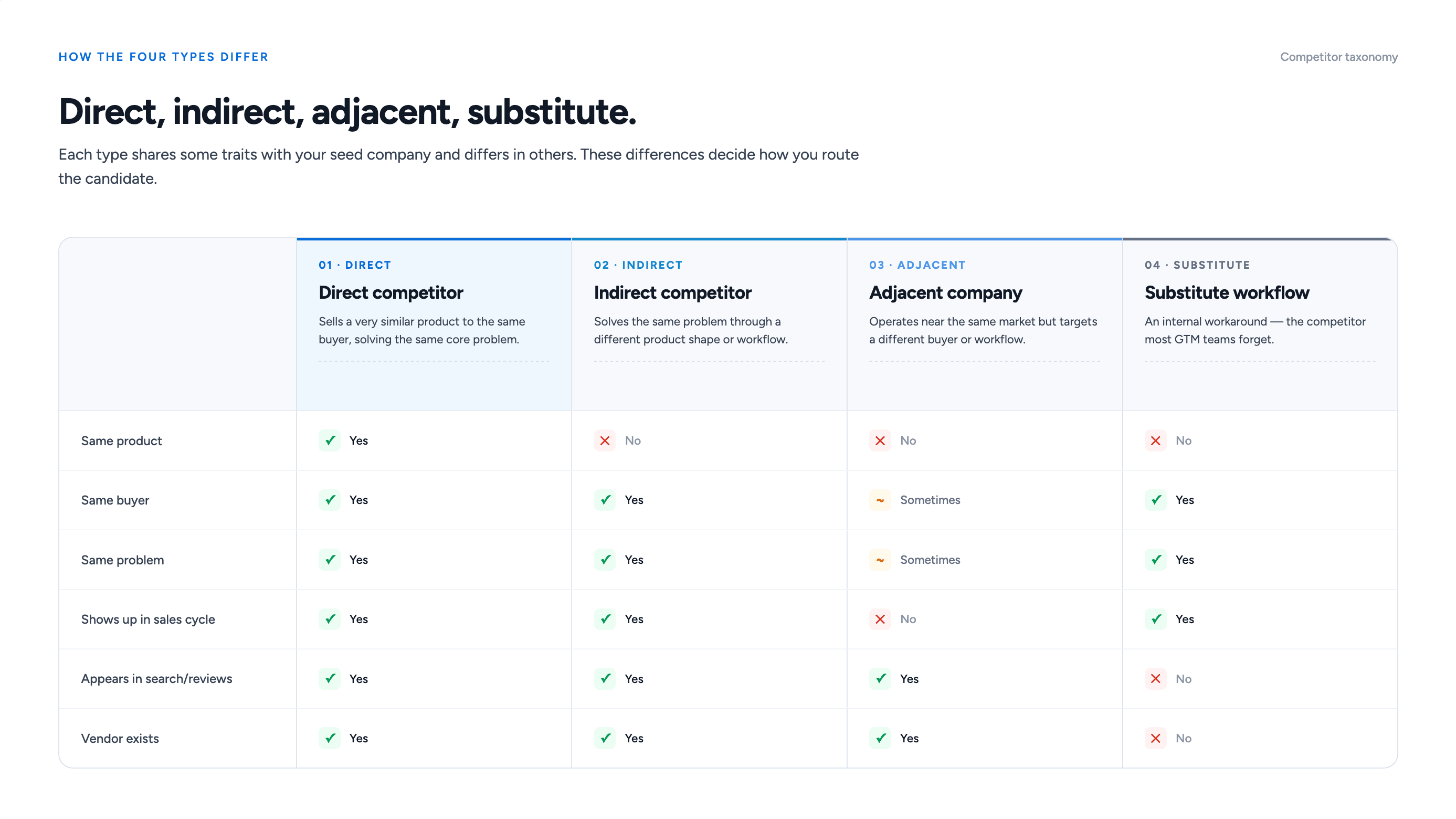
What to do: Build competitor lists with four labels: direct competitor, indirect competitor, adjacent company, and substitute workflow. That one taxonomy makes every later step cleaner.
Why GTM Teams Need Better Competitor Lists
Most articles about competitor research are written for SEO teams, MBA-style strategy exercises, or one-off positioning projects. They explain SWOT analysis, keyword overlap, and market positioning.
That can be useful, but GTM teams need more than a slide.
Modern GTM teams need competitor data that can move through systems. The list has to work inside a CRM, a Clay table, an n8n workflow, a data warehouse, a territory model, or an AI agent.
That shift matters because buyers are doing more research before they ever talk to sales. Gartner reported in March 2026 that 67% of B2B buyers prefer a rep-free buying experience, and 45% used AI during a recent purchase, based on a survey of 646 B2B buyers conducted in August and September 2025.
That means your buyers are already comparing you, your competitors, and alternative workflows before a rep enters the conversation. If you do not know what else is in that buying process, you cannot build comparison pages, retargeting, outbound angles, or sales context that meets buyers where they already are.
Here is the thing most people miss: AI does not magically know your market. It needs structured context.
If you give an AI agent a vague instruction like "find competitors for this company," it can produce a passable first list. But if you give it a seed domain, a lookalike company list, firmographic data, traffic proxies, country filters, product descriptions, and a classification prompt, the output becomes much more useful.
What to do: Treat competitor discovery as a feed, not a report. The goal is not a pretty spreadsheet. The goal is a qualified, refreshable list that GTM systems can use.
Why Manual Competitor Research Breaks at Scale
Manual research still has a place. I use it all the time when I want to understand how a category talks about itself.
But manual research breaks when you need coverage, repeatability, or speed.
- Google misses niche competitors. It finds visible companies with strong SEO, but often misses early-stage tools, local players, developer-first products, and companies with messy category language.
- SEO tools show search competitors. A review site, affiliate site, or blog may compete for the same keyword without competing for the same buyer budget.
- Directories favor known vendors. G2, Capterra, Product Hunt, and marketplaces are useful, but they skew toward companies with awareness, reviews, and listing discipline.
- Static spreadsheets decay. Companies reposition, launch features, get acquired, change pricing, move upmarket, enter new regions, or quietly die.
At CompanyEnrich, I have seen this most clearly when teams move from founder-led sales to repeatable outbound. At first, the founder knows the market by memory. Then the team grows, the CRM fills up, and suddenly that market knowledge needs to become structured data. That is where spreadsheets stop being enough.
What to do: Use manual research to define the market language, then use structured company data to scale the list.
How to Find Competitors of a Company Manually
Manual research is still the best way to understand the language of a category.
Before touching an API, start with broad category and use-case searches:
- "best product update tools"
- "changelog software"
- "release notes software"
- "customer announcement tools"
- "how to announce product updates to users"
- "how to publish release notes"
- "how to collect feedback on product updates"
Check G2, Capterra, Product Hunt, Chrome Web Store, integration marketplaces, and partner directories. Do not just copy the category list. Read the review language.
Reviewers often mention the alternatives they considered, the workflow they replaced, and the feature that made them switch. Crunchbase can add a funding and acquisition layer, which helps you separate active competitors from tiny tools that happen to share keywords.
SEO tools can help too, but use them carefully. Ahrefs, Semrush, and similar tools show domains competing for search demand. That is useful for content strategy, but a search competitor is not always a product competitor.
The highest-quality manual source is still your customers. Ask:
- What tools did you compare before choosing us?
- What workflow were you using before?
- Which competitor came up internally?
- What almost stopped you from buying?
- What category name did your team use when searching?
This gives you the market from the buyer's side, not the vendor's side. Reddit, LinkedIn comments, Slack communities, and founder groups can also reveal alternatives that do not show up in polished category pages.
Win-loss programs make this even stronger. Clozd's 2025 State of Win-Loss Report found that 63% of companies report win-rate increases from win-loss analysis, rising to 84% for programs running longer than two years. That supports the manual interview step: buyers often name the competitors, substitutes, and decision criteria that tools miss.
What to do: Use manual research to build your first 20 to 50 competitor candidates and the vocabulary for the market. Then use a lookalike API to expand and structure the list.
How to Find Competitors of a Company With a Lookalike API
A lookalike companies API takes a seed company and returns companies that resemble it across multiple signals. That turns competitor discovery from research into a scalable data workflow.
We built the CompanyEnrich Similar Companies API for AI-powered lookalike search: it scores similarity across business model, context, industry, and related attributes, then returns the full enriched company profile in one call. That means you can qualify the results without making a second enrichment request for every company.
Here is the practical flow.
Step 1: Start with a seed company
Pick a seed domain that represents the market you want to map.
For this example, we will use:
announcekit.appThis seed points toward product announcements, changelogs, release notes, and customer communication tools.
Step 2: Call the CompanyEnrich Similar Companies API
Use your API key, not the placeholder below.
curl -X POST 'https://api.companyenrich.com/companies/similar' \
  -H 'Content-Type: application/json' \
  -H 'Authorization: Bearer YOUR_API_KEY' \
  -d '{
    "domains": [
      "announcekit.app"
    ],
    "similarityWeight": 1,
    "page": 1,
    "pageSize": 10
  }'
Step 3: Review the returned company list
The response includes candidate companies such as LaunchNotes, Noticeable, Headway, ProductVoice, ReleaseNotes, Beamer, Changelogfy, ProductEcho, ReleasePad, and Engagespot.
A simplified response looks like this:
{
  "items": [
    {
      "name": "LaunchNotes",
      "domain": "launchnotes.com",
      "industry": "Software",
      "employees": "1-10",
      "revenue": "1m-10m",
      "location": { "country": { "code": "US", "name": "United States" } },
      "financial": {
        "total_funding": 16800000,
        "funding_stage": "series_a"
      },
      "keywords": ["release notes", "product roadmaps", "customer feedback", "in-app announcements"],
      "page_rank": 3.8258402
    }
  ],
  "metadata": { "scores": { "01925c82-f8ac-7af3-b8a4-e1dd5bd7e30c": 0.89290607 } },
  "page": 1,
  "totalItems": 5188
}
Step 4: Treat the API output as candidates, not final truth
The API has done the hard discovery work. Your job is qualification.
- LaunchNotes looks like a direct competitor because it overlaps on release notes, product communications, roadmaps, and customer feedback.
- Noticeable looks like a strong competitor or close adjacent product because it overlaps on product updates, in-app widgets, changelog pages, and customer retention.
- Engagespot may be adjacent rather than direct because it is more developer-focused notification infrastructure.
What to do: Use the API to generate candidates, then use a qualification layer to classify each company before you add it to a GTM list.
How to Qualify Whether a Similar Company Is Actually a Competitor
This is the most important part of the workflow because similarity is not the same as competition.
A company can share keywords, industry labels, or technologies with your seed company and still sell to a different buyer. A good competitor workflow needs a qualification model.
Competitor Qualification Signals
| Signal | Why It Matters | Example Field |
|---|---|---|
| Similarity score | Ranks closeness to the seed company | metadata.scores |
| Keywords | Shows product and use-case overlap | release notes, changelog |
| Employees | Helps compare company size | 1-10, 11-50 |
| Country | Filters by target market | US, FR, SE |
| Revenue | Prioritizes commercial relevance | 1m-10m, 10m-50m |
| Funding | Shows growth stage and pressure | series_a, private_equity |
| Technologies | Supports GTM segmentation | Intercom, AWS, Webflow |
| Page rank or traffic | Prioritizes visible market players | page_rank: 4.87, Similarweb |
Start with product overlap. Does the candidate solve the same customer problem, use similar category language, target similar roles, and appear in the same buyer comparison set? Then layer in company size, country, revenue, funding, technologies, and traffic signals.
A Series A competitor with $16.8M in funding, strong category keywords, and a US market focus should usually receive more attention than a tiny side project with the same keywords and no commercial traction.
What to do: Give each company a classification and a confidence score. Do not send every lookalike directly into sales workflows.
How to Use AI to Classify Competitor Candidates
AI becomes genuinely useful here, not as the source of truth, but as the analyst layer.
The lookalike API gives you structured data. AI can read the company description, keywords, location, size, funding, technologies, and score, then answer the question a human analyst would ask: is this company really in a competitive space, or is it only similar on the surface?
This is why the prompt format matters. Mastra's Principles of Building AI Agents frames modern agents around tools, memory, workflows, retrieval, and traces. Competitor discovery fits that pattern: the model is only useful when it can call reliable company data, remember CRM context, and return structured decisions instead of loose guesses.
Use a prompt like this for each candidate company:
You are a GTM analyst. I will give you a seed company and a candidate similar company.

Classify the candidate as one of:
- Direct competitor
- Indirect competitor
- Adjacent company
- Not a competitor

Use these criteria:
- Product category overlap
- Target customer overlap
- Company size
- Country or market focus
- Revenue range
- Funding stage
- Website authority or traffic proxy
- Keywords and positioning
- Technologies and GTM relevance

Return:
1. Classification
2. Confidence score from 0 to 100
3. Short reasoning
4. Which fields influenced the decision
5. Whether this company should be added to a GTM competitor list
Here is an example input:
{
  "seed_company": {
    "name": "AnnounceKit",
    "domain": "announcekit.app",
    "category": "product announcement and changelog software"
  },
  "candidate_company": {
    "name": "LaunchNotes",
    "domain": "launchnotes.com",
    "description": "LaunchNotes is a product communications platform that centralizes release notes, roadmaps, and customer feedback for enterprise teams.",
    "employees": "1-10",
    "revenue": "1m-10m",
    "country": "United States",
    "funding_stage": "series_a",
    "total_funding": 16800000,
    "keywords": ["release notes", "product roadmaps", "customer feedback", "in-app announcements"],
    "page_rank": 3.8258402
  }
}
Expected output:
{
  "classification": "Direct competitor",
  "confidence": 92,
  "reasoning": "LaunchNotes overlaps strongly with AnnounceKit on release notes, product communications, announcements, and product feedback. It targets product and customer-facing teams in SaaS, which makes it a direct competitive match.",
  "fields_used": ["description", "keywords", "funding_stage", "revenue", "country"],
  "add_to_gtm_competitor_list": true
}
You can route direct competitors into battlecard research, indirect competitors into positioning research, adjacent companies into partner or category monitoring, and irrelevant companies into a suppression list.
When we design workflows like this at CompanyEnrich, the goal is not to replace human judgment. The goal is to remove the first 80% of manual sorting. A GTM operator should review the edge cases, not read 5,000 company descriptions from scratch.
What to do: Put an AI classification step between lookalike discovery and CRM export. That one step prevents noisy data from becoming noisy sales activity.
Which Tools Help You Find Competitors of a Company?
The best tool depends on the job. Sometimes you need a market snapshot. Sometimes you need a usable account list. Sometimes you need a production data workflow.
Competitor Discovery Tool Map
| Tool Type | Examples | Best For | Watch Out For |
|---|---|---|---|
| Review platforms | G2, Capterra | Direct category competitors | Misses unlisted or early-stage tools |
| Funding databases | Crunchbase | Funding, acquisitions, growth signals | Not every bootstrapped company is visible |
| SEO tools | Semrush, Ahrefs | Search competitors and content gaps | Search overlap is not always product overlap |
| Lookalike APIs | CompanyEnrich, Ocean.io | Scalable company discovery from seed domains | Requires qualification logic |
| Workflow tools | Clay, n8n | Routing data across providers and CRM | Needs a clean data source underneath |
For a founder doing one market map, manual tools may be enough. For repeatable account discovery, start with a lookalike API and route the output through your CRM, data warehouse, or orchestration layer.
How Do You Turn Competitor Discovery Into a Production GTM Workflow?
Here is the workflow I would use if I were helping a GTM team productionize competitor discovery:
- Pick the seed company: Use your own company, a known direct competitor, a best-fit customer, a prospect's current vendor, or a category leader. Avoid marketplaces, media sites, and companies with unclear positioning.
- Use semantic search if you do not have a seed: Start from a natural-language description like "SaaS tools for product announcements and release notes."
- Call the Similar Companies API: Start with 10 to 25 companies. Review quality, then expand page size or pagination once you trust the output.
- Normalize the fields: Keep name, domain, similarity score, description, keywords, employees, revenue, country, funding stage, technologies, page rank, LinkedIn URL, and G2 URL.
- Apply ICP filters: Remove obvious mismatches by region, employee range, category, and domain quality before AI classification.
- Run AI classification: Return direct competitor, indirect competitor, adjacent company, or not a competitor, plus confidence, reasoning, and fields used.
- Review edge cases manually: Look at low-confidence direct competitors, high-authority adjacent companies, funded companies in the right category but wrong region, and strong keyword matches with a different buyer persona.
- Route and refresh the list: Send qualified competitors to CRM tags, battlecards, displacement campaigns, product marketing, win-loss analysis, and refresh schedules.
How GTM Teams Use Competitor Lists
A good competitor list is not just a product marketing asset. It can power several GTM motions:
- TAM mapping: Start with best customers or known competitors, then find lookalike companies to map the broader market.
- Outbound account building: Use competitor discovery to create account lists, filter by country, employee count, and funding, then find decision-makers at those accounts.
- Displacement campaigns: If a prospect uses a competitor, messaging can focus on the specific limitation teams usually switch away from.
- ICP expansion: Lookalike discovery can reveal adjacent markets such as roadmap tools, customer feedback tools, changelog widgets, release automation, and notification infrastructure.
- Partner research: Adjacent companies are not always competitors. Some solve a related workflow and belong on a partner list.
- AI agent workflows: A competitor research agent can accept a seed company, pull similar companies, classify competitors, enrich accounts, summarize positioning, write CRM notes, and flag sales plays.
A useful proof point outside sales comes from Marvin Ventures. Marvin VC was reviewing 60+ inbound B2B SaaS opportunities per month and used automated company reports to compress roughly 5 hours of analyst work into 5 minutes per company. The context is venture due diligence, not outbound sales, but the pattern is the same: once company research becomes programmatic, it stops being the bottleneck in account evaluation.
Common Mistakes When Finding Competitors
I see these mistakes often:
- Only looking at direct competitors: Buyers compare categories, workflows, and internal options too.
- Confusing SEO competitors with business competitors: A review site ranking for your keyword is not necessarily competing for your buyer's software budget.
- Building a one-time spreadsheet: If the list cannot be refreshed, scored, exported, and connected to systems, it will age quickly.
- Trusting one data source: Use multiple signals: description, keywords, traffic proxy, country, employee count, funding, technologies, review profiles, and human judgment.
- Sending outreach without CRM context: If an AI workflow does not check CRM status, it might email an active customer, late-stage opportunity, or account already owned by another rep.
- Over-automating the judgment layer: AI classification is useful, but edge cases still need review.
What to do: Build a workflow where automation creates leverage and humans handle judgment. That is the balance.
Frequently Asked Questions
How do you find competitors of a company?
The best way to find competitors of a company is to combine manual research with structured company data. Start with Google, review sites, SEO tools, LinkedIn, and customer interviews to understand the category. Then use a similar companies API to generate candidates from a seed domain and classify them as direct competitors, indirect competitors, adjacent companies, or irrelevant matches.
What is a similar companies API?
A similar companies API is an endpoint that accepts a company identifier, such as a domain, and returns companies that resemble it. The CompanyEnrich Similar Companies API uses AI-powered matching to find lookalikes based on business model, context, industry, and related attributes. GTM teams use this for competitor discovery, TAM mapping, account building, lead scoring, and market research.
What is the difference between a direct competitor and an indirect competitor?
A direct competitor sells a similar product to the same buyer and solves the same core problem. An indirect competitor solves the same problem through a different product, service, or workflow. For example, a changelog tool may directly compete with another changelog tool, but indirectly compete with customer communication platforms, roadmap tools, or an internal Slack and Notion workflow.
How can AI help find competitors of a company?
AI can help classify competitor candidates after a lookalike API returns similar companies. Give the model the seed company, candidate company, description, keywords, size, country, revenue, funding, technologies, and traffic proxy, then ask it to classify the company as direct, indirect, adjacent, or irrelevant. AI works best as a qualification layer, not as the only source of competitor data.
What signals should I use to decide if a company is really a competitor?
Use product category overlap, target customer overlap, keywords, company description, employee count, country, revenue range, funding stage, technologies, and web authority or traffic signals. Similarity score is useful, but it should not be the only input. The best competitor lists combine API output, AI classification, and human review for edge cases.
How often should you update competitor research?
For strategy, update competitor research quarterly. For outbound, CRM enrichment, AI agents, and displacement campaigns, refresh it monthly or continuously. Competitors change positioning, pricing, product pages, and target markets often enough that a one-time spreadsheet becomes stale quickly.
Conclusion: Competitor Discovery Is Now a Data Workflow
If you only need five competitors for a strategy slide, manual research is enough. If you need a competitor list for GTM, outbound, TAM mapping, partner research, CRM enrichment, or AI agents, you need a workflow.
Start with a good seed company. Use a lookalike API to generate candidates. Qualify each company with size, country, revenue, funding, keywords, technologies, and traffic proxies. Then use AI to classify the candidates before they enter your GTM systems.
That is how competitor discovery becomes operational: a feed, not a report.
To try the API workflow, start with the CompanyEnrich Similar Companies API or explore the broader CompanyEnrich B2B data platform.

Written by Amir, co-founder and CEO of CompanyEnrich. He has 10+ years of experience in B2B SaaS and data infrastructure, and previously founded and exited two B2B SaaS startups before starting CompanyEnrich. He now helps enterprises and startups integrate B2B intelligence into AI agents, workflows, and GTM operations.
Connect on LinkedIn