How to Build Perfect CRM Enrichment: Workflows, Plays, and AI Agents
A practical guide to CRM enrichment: turn CRM data into sales decisions with company enrichment, people data, ICP scoring, job-change monitoring, and MCP workflows.
Summarize this blog post with
 ChatGPT
 Perplexity
 Claude
 Grok
Grok Google AI
Most teams treat CRM enrichment like a field-filling project. Add company size. Add industry. Add job title. Maybe add a LinkedIn URL.
That is the old way to think about it.
Perfect CRM enrichment is not about making rows look complete. It is about making CRM data useful enough for sales teams to make better decisions. Who should get routed to enterprise sales? Which accounts look like your best customers? Which champions changed jobs? Which companies are growing fast enough to become priority accounts this quarter?
Over the past 10+ years building B2B SaaS and data products, I have seen the same pattern again and again: teams do not lose revenue because they lack a CRM. They lose revenue because their CRM is full of data nobody trusts.
What This Guide Covers
This guide explains how to turn CRM enrichment from a checkbox into a sales decision system. Inside, you will learn:
- What CRM enrichment actually means beyond filling blank fields.
- Why native CRM enrichment helps, but rarely solves the full problem.
- How to build a practical CRM enrichment workflow from audit to refresh.
- How to use reverse email lookup, people data, ICP scoring, and lookalikes.
- Why job changes, headcount growth, funding, news, and technology signals matter.
- How MCP servers can make CRM enrichment more flexible for AI-assisted GTM workflows.
- How to govern enriched data without creating a messy overwrite machine.
The short version: CRM enrichment should help your team decide who to sell to, when to sell, what to say, and which accounts deserve priority. If it only fills empty fields, it is not doing enough.
What Is CRM Enrichment?
CRM enrichment is the process of adding, updating, validating, and operationalizing external data inside your CRM so sales, marketing, customer success, and RevOps teams can act with better context.
The key word is operationalizing.
If your enrichment provider adds 20 fields to HubSpot or Salesforce, but sales never uses those fields to prioritize accounts, route leads, personalize outreach, or protect renewals, then you did not build enrichment. You bought data decoration.
In practical terms, CRM enrichment should answer questions like:
- Is this company a real business or a junk domain?
- Is this inbound lead from a target account?
- Is this account SMB, mid-market, or enterprise?
- Which sales team should own it?
- Who are the likely decision makers?
- Does this company look like our closed-won customers?
- Did our champion leave?
- Is the account growing, shrinking, hiring, funded, or changing tools?
- When was this data last verified?
That is why I prefer to define CRM enrichment like this:
CRM enrichment is the system that turns raw CRM records into useful sales context.
Not complete records.
Useful records.
What data should CRM enrichment include?
A good CRM enrichment system usually has six layers.
| Data layer | Examples | Why sales teams need it |
|---|---|---|
| Company identity | Name, domain, website, logo, social URLs | Prevents duplicate accounts and makes records recognizable. |
| Firmographics | Employee count, revenue, industry, location, NAICS, funding | Helps segment, score, route, and prioritize accounts. |
| Technographics | Tools, platforms, ecommerce stack, cloud stack | Helps tailor messaging and qualify fit. |
| People data | Name, title, seniority, department, current company | Helps identify decision makers and buying committee members. |
| Dynamic signals | Headcount growth, job changes, hiring, funding, news, leadership changes | Helps sales act at the right time. |
| Operational metadata | Source, confidence, last verified date, enrichment status, match ID | Helps RevOps trust, audit, and refresh the data. |
Most native CRM enrichment tools cover part of this. For example, HubSpot Breeze can fill contact and company properties like industry, job title, company size, and employee count. Attio enrichment can add company attributes like logo, description, location, estimated ARR, employee range, funding, and social media, depending on plan and availability.
That is useful.
But perfect CRM enrichment goes beyond the baseline. The difference is freshness, fit, and action.
What to do: Treat every enrichment field as a sales decision input. If a field does not help route, score, prioritize, personalize, segment, or refresh a record, question whether it belongs in your CRM.
Why CRM Enrichment Matters More Than Ever
CRM data gets stale because companies and people keep moving.
People change jobs. Champions leave. Buyers get promoted. Companies rebrand. Domains change. New subsidiaries appear. Funding rounds happen. Teams grow. Teams shrink. Technology stacks change. News creates new buying moments.
Your CRM does not automatically understand any of that unless you design it to.
According to Gartner, poor data quality costs organizations at least $12.9 million per year on average. That number is not just a data team problem. It shows up in the sales motion as misrouted leads, duplicate accounts, bounced emails, bad territories, weak segmentation, and reps spending time researching accounts that should have been enriched before they touched the record.
Salesforce reported in its sixth State of Sales research that sales reps spend 70% of their time on non-selling tasks. Not all of that is caused by CRM data, of course. But bad CRM data is one of the easiest ways to create more non-selling work.
Here is what that looks like in real life:
- A rep gets an inbound lead with only an email address and has to research the company manually.
- A lead from a 2,000-person account gets routed to SMB because employee count is missing.
- A champion leaves a customer account and nobody notices until renewal risk appears.
- A company changes domains and ends up as two separate CRM accounts.
- A closed-won pattern is obvious in hindsight, but nobody uses it to find lookalike accounts.
- A sales team works a territory based on old firmographics while the market has moved.
CRM enrichment matters because sales teams need the CRM to do more than store history. They need it to help them decide what to do next.
One of the patterns I see often is that teams start enrichment because they are embarrassed by blank fields. But the real value shows up later, when routing gets cleaner, high-fit inbound leads move faster, and sales managers can finally trust account segments. That is when CRM enrichment stops being a data cleanup project and starts becoming a revenue system.
What to do: Do not measure CRM enrichment only by field completion. Measure whether enriched data improves routing accuracy, account prioritization, segmentation, renewal monitoring, and rep research time.
Most CRMs Already Have Enrichment. So Why Is There Still a Problem?
This is the question most teams ask first.
If HubSpot, Salesforce, Attio, Microsoft Dynamics, Zoho, Pipedrive, and other CRMs already support enrichment through native features, marketplaces, partners, or automation tools, why do teams still buy external enrichment APIs?
Because native enrichment is a starting point.
It is rarely the full system.
Modern CRMs are moving in the right direction. HubSpot promotes data enrichment that automatically fills missing contact and company fields and can continuously enrich existing records. Attio automatically enriches person and company records with attributes like logos, descriptions, locations, employee ranges, funding, and social handles. Microsoft describes AI-powered Data Enrichment for Dynamics 365 Sales as a way to analyze recent email interactions, identify missing or outdated opportunity fields, and suggest updates for better forecasting and deal review, according to Microsoft Learn.
That proves the category is real.
But native enrichment usually has five limits.
Native CRM enrichment is optimized for baseline fields
Most native enrichment is designed to make records usable inside that CRM. It fills common fields like company name, logo, industry, employee count, location, job title, and social profiles.
That is helpful, but it does not always solve advanced GTM questions:
- Which companies are most similar to our closed-won customers?
- Which accounts are growing engineering headcount this quarter?
- Which champions changed jobs?
- Which companies are hiring roles that suggest budget for our product?
- Which company is behind this inbound personal email or alternate domain?
- Which provider is strongest for this specific field or market?
The more strategic the question, the more likely you need a flexible enrichment layer outside the CRM.
Native enrichment is often tied to one ecosystem
CRM-native enrichment is convenient if your entire workflow lives inside one CRM.
Most serious GTM systems do not.
The data may need to flow into:
- Salesforce or HubSpot.
- A data warehouse.
- A product database.
- A lead routing system.
- A marketing automation tool.
- A customer success platform.
- A scoring model.
- An AI agent.
If enrichment only works inside one CRM, your CRM becomes the only place where your data is intelligent. That creates a bottleneck.
Native enrichment does not always update the way your sales process needs
Some teams need monthly refreshes. Some need weekly refreshes for target accounts. Some need enrichment the second an inbound lead fills a form. Some need to refresh only strategic accounts because refreshing every low-value record is wasteful.
Perfect CRM enrichment needs a refresh strategy, not just a record creation event.
Native enrichment may not expose the signals you need
The highest-value signals are often dynamic:
- Job changes.
- Champion movement.
- Funding events.
- Hiring patterns.
- Headcount growth.
- Department-level growth.
- Leadership changes.
- News.
- Technology stack changes.
- Similarity to closed-won accounts.
These signals are not just fields. They are triggers.
No provider is best at every field
Enrichment quality is field-specific. In our company enrichment API benchmark, CompanyEnrich led several identity, social, and firmographic fields, Apollo led technologies and founded year, People Data Labs led employees and company type, and ContactOut and Crustdata tied on revenue. Our guide to the best company data APIs maps those field-level results to specific workflows.
The important detail is not "one vendor wins everything." It does not.
The important detail is that enrichment providers have different strengths. A serious CRM enrichment workflow should let you use each provider where it performs best, or at least test providers against your actual ICP instead of trusting generic coverage claims.
What to do: Use native CRM enrichment for the baseline. Use API-first enrichment when you need freshness, custom workflows, lookalikes, job-change monitoring, external systems, or provider flexibility.
How to Build a CRM Enrichment Workflow, Step by Step
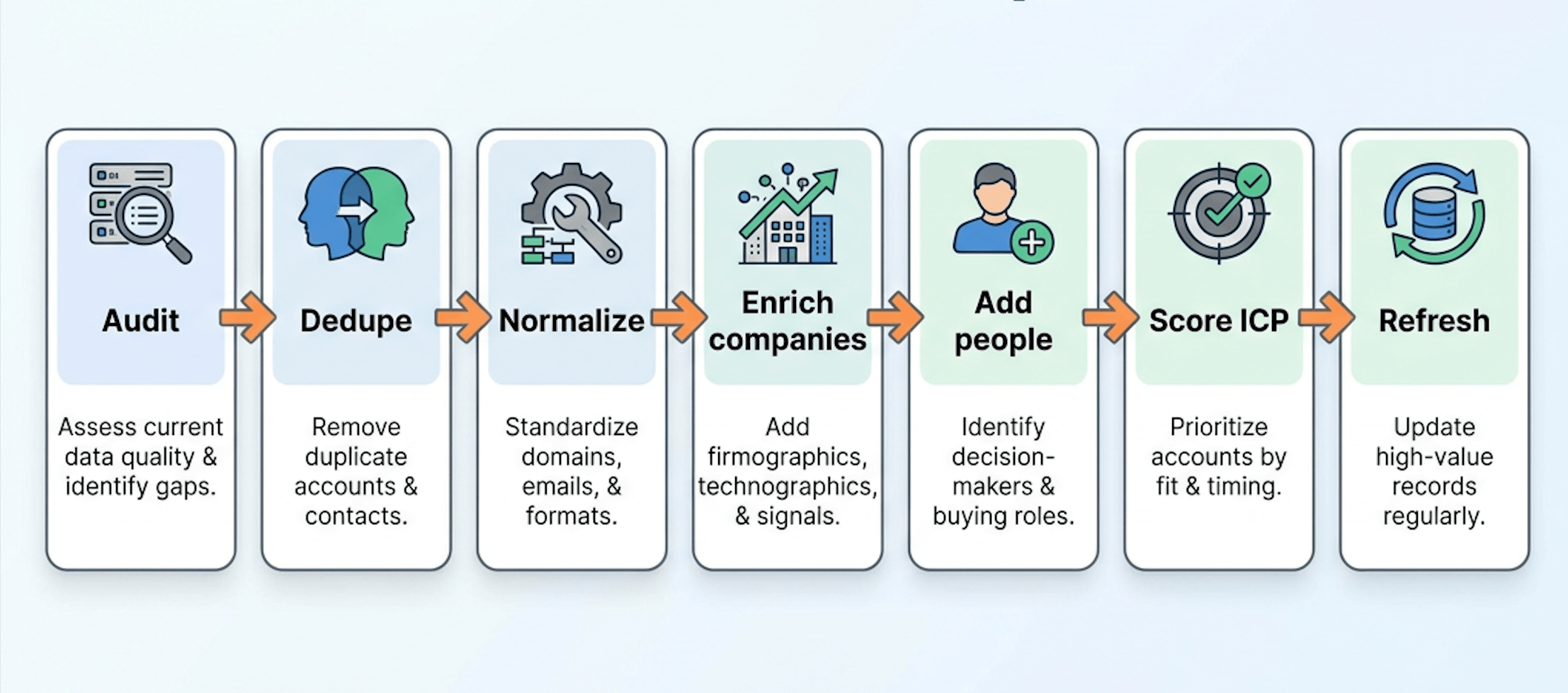
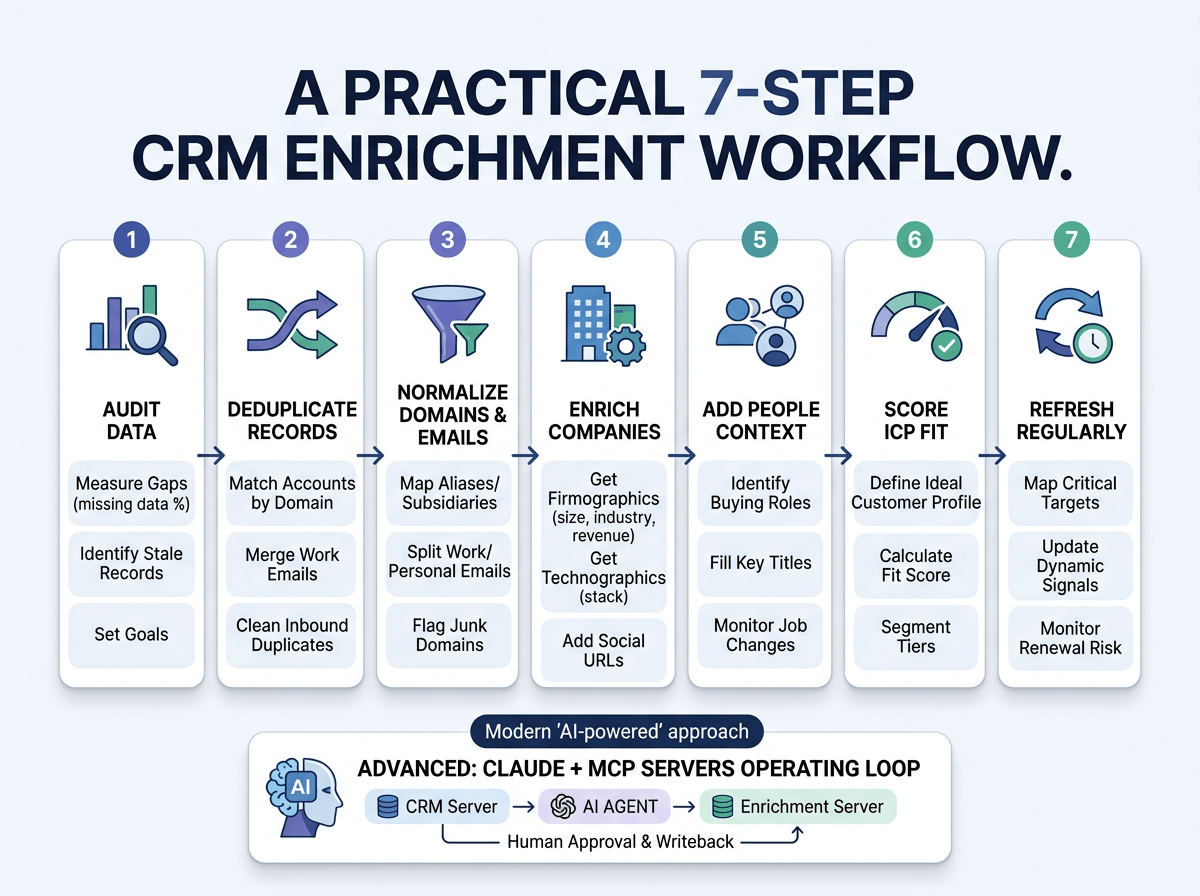
A good CRM enrichment workflow is not complicated. It just needs order.
Most teams make the same mistake: they enrich messy records first, then try to clean the CRM later. That reverses the work. If duplicates, bad domains, personal emails, and inconsistent schemas already exist, enrichment will magnify the mess.
Build the pipeline in this order.
Step 1: Audit your CRM data
Start by understanding the current state.
Pull a sample of accounts, contacts, leads, and opportunities. Then measure:
- Percentage of records missing domain.
- Percentage of accounts with duplicate names.
- Percentage of contacts with personal emails.
- Percentage of contacts missing title or seniority.
- Percentage of companies missing employee count, industry, country, and revenue.
- Percentage of records without a last verified date.
- Percentage of records with conflicting fields across systems.
You do not need a perfect audit. You need enough signal to decide where the workflow should start.
If 40% of your accounts do not have a domain, domain normalization becomes a priority. If your buying committee coverage is thin, people enrichment becomes a priority. If churned customer accounts have no champion history, job-change monitoring becomes a priority.
What to do: Create a simple data quality dashboard with field completion, duplicate rate, stale-record rate, and enrichment status by segment.
Step 2: Deduplicate accounts and contacts
Deduplication should happen before enrichment.
If the same company exists as "Stripe," "Stripe Inc," "stripe.com," and "Stripe Payments," enrichment can create four versions of the same account profile. That breaks ownership, reporting, routing, and account history.
Use stable identifiers when possible:
- Company domain for accounts.
- Work email for contacts.
- LinkedIn or professional profile URL when available.
- Internal account ID after matching is complete.
Do not rely only on company name. Names vary too much, especially across subsidiaries, local entities, abbreviations, and rebrands.
What to do: Before enriching, decide your CRM's unique match key for accounts and contacts. For most B2B teams, domain is the best account key and work email is the best contact key.
Step 3: Normalize domains and emails
Domain normalization is where a lot of CRM enrichment quietly succeeds or fails.
A company may use multiple domains:
company.comcompany-external.comcompany-team.com- Regional domains.
- Old domains after a rebrand.
- Subsidiary domains.
Your CRM should understand when those domains point to the same business entity.
That does not mean you should collapse everything blindly. It means you need an entity resolution layer that can map alternate domains, redirect domains, subsidiaries, and aliases to the right company record.
For emails, normalize:
- Lowercase emails.
- Remove whitespace.
- Detect free email domains like Gmail, Yahoo, and Outlook.
- Split work domains from personal domains.
- Flag disposable or suspicious domains.
- Avoid treating personal email domains as companies.
This matters for inbound forms. If someone signs up with name@gmail.com, you may still identify the person, but you should not assign the company as Gmail. If someone signs up with name@company-team.com, you need to know whether that maps to the main company.
What to do: Build a domain normalization step before enrichment. Store both the raw submitted domain and the resolved company domain.
Step 4: Enrich companies from domains
Once domains are normalized, enrich the company profile.
For a known domain, a company enrichment API should return the core account context:
- Company name.
- Website.
- Logo.
- Industry.
- Categories.
- Employee count or range.
- Revenue range.
- Location.
- Social URLs.
- Technologies.
- Funding data when available.
- Company type.
- Description.
- Keywords.
- NAICS codes.
A company enrichment provider should be able to enrich a company from domain, name, website, or social profile and return a structured company profile for CRM enrichment, routing, scoring, and automation. For example, CompanyEnrich's Company Enrichment API is built around this workflow.
Do not dump every returned field into your CRM just because it exists. Map fields intentionally.
Use three layers:
| Layer | Where it belongs | Example |
|---|---|---|
| Raw provider payload | Data warehouse or hidden CRM object | Full API response for audit and replay. |
| Normalized CRM fields | Account and contact objects | Industry, size, revenue, country, technologies. |
| Sales action fields | Views, queues, alerts, scores | ICP tier, route, refresh status, next best action. |
This keeps the CRM usable while preserving raw detail for technical teams.
What to do: Start with 10-15 fields that actually drive routing, scoring, segmentation, and sales action. Add more only when the team proves they need them.
Step 5: Add people and decision-maker context
Company data tells you whether an account is a fit. People data tells you who to contact.
For many teams, the CRM has a painful gap: the account is enriched, but the buying committee is missing. There is one inbound lead, one old champion, or one generic info email.
That is not enough for modern B2B selling.
Use people data to answer:
- Who works at this company in the target department?
- Who has the right seniority?
- Who is likely to be the economic buyer?
- Who is likely to be the technical evaluator?
- Who was the past champion?
- Who recently changed role or company?
A people search provider should help you find relevant people by name, title, company, seniority, department, experience, and location. CompanyEnrich's People Search API is useful here when you need to fill decision-maker gaps after company-level enrichment.
Do not add every possible contact to the CRM. That creates noise.
Add people based on a role map:
- Economic buyer.
- Technical evaluator.
- Champion.
- User.
- Influencer.
- Customer success owner.
- Renewal owner.
What to do: Define the buying roles that matter for your product, then enrich only the people data needed to identify those roles.
Step 6: Score accounts by ICP fit
Enrichment data becomes valuable when it feeds a decision.
ICP scoring is one of the clearest decisions.
A basic ICP score might include:
- Industry fit.
- Employee count fit.
- Country or region.
- Revenue range.
- Technology stack.
- Company type.
- Funding stage.
- Department growth.
- Similarity to closed-won customers.
- Exclusion criteria.
You can do this with rules. You can also do it with an AI workflow that evaluates account fit using enriched company context, as long as the scoring prompt is grounded in clean data. For example, CompanyEnrich has an open-source ICP score agent that shows this pattern.
The important principle is simple: AI scoring only works if the underlying company data is clean, current, and structured.
Bad data gives you confident nonsense.
Good data gives you a useful sales signal.
What to do: Separate fit score from timing score. A company can be a perfect ICP match but not ready to buy this quarter.
Step 7: Refresh high-value records regularly
CRM enrichment is not finished after the first lookup.
Some fields barely change. Others change constantly.
Refresh cadence should match business value and field volatility:
| Record or signal | Suggested refresh cadence | Why |
|---|---|---|
| Strategic target accounts | Weekly or monthly | Sales needs current signals and routing accuracy. |
| Open opportunities | Weekly | Job changes, funding, headcount, and news can affect deal timing. |
| Active customers | Monthly or quarterly | Champion movement and company changes affect expansion and renewal. |
| Low-fit old leads | Quarterly or semiannual | Useful for reactivation, but lower priority. |
| Static firmographics | Quarterly | Industry and location change less often. |
| Dynamic signals | Weekly or event-based | Job changes, hiring, news, and funding are timing signals. |
Store last_enriched_at, last_verified_at, and enrichment_source. Without those fields, nobody knows whether the CRM record is fresh or ancient.
What to do: Refresh based on account value. Do not spend the same enrichment effort on a dead lead as you do on an open enterprise opportunity.
The CRM Enrichment Plays That Actually Move Revenue
The workflow above gives you the system. These plays make it useful.
Inbound lead enrichment
Inbound leads often arrive with one useful field: email.
That is enough to start, but it is not enough for sales.
With reverse email lookup, you can turn an email into person and company context before the lead reaches a rep. A good reverse email lookup provider should return person details and company data, such as name, job title, professional profile URL, company domain, industry, employees, revenue, location, technologies, funding, and social URLs when available. CompanyEnrich's Reverse Email Lookup API is one way to run this workflow.
The workflow looks like this:
- Lead submits a form.
- System checks whether the email is work, personal, disposable, or suspicious.
- Reverse email lookup resolves person and company context.
- Company enrichment fills missing account fields.
- Lead is scored by ICP fit.
- Lead is routed to the right rep or nurture path.
- CRM stores enrichment source and timestamp.
This is one of the fastest ways to make CRM enrichment visible to sales. Instead of asking reps to research inbound leads manually, the CRM can hand them the account context immediately.
What to do: Use reverse email lookup at the point of capture, not days later in a batch job. Speed matters most when inbound intent is fresh.
Closed-won lookalike prospecting
Most territory planning starts with guesswork.
"Let's target SaaS companies with 50-500 employees in the United States."
That might be fine for a first pass. It is not a serious prospecting strategy.
Closed-won lookalike prospecting starts from a better question: what do our best customers actually have in common?
Sometimes the answer is not obvious. Your best customers may share technologies, funding patterns, hiring signals, business models, product categories, department growth, or website positioning. Those signals are hard to see from basic CRM fields.
Enrich the closed-won accounts first. Then use a lookalike API to find companies that match the real pattern.
The workflow is simple:
- Export 50-100 closed-won accounts.
- Remove bad-fit wins, one-off deals, and accounts you do not want more of.
- Enrich each company profile.
- Identify shared traits across your best customers.
- Use similar-company search to find lookalikes.
- Filter by geography, employee count, industry, technologies, or exclusions.
- Push the strongest matches into CRM as target accounts.
- Route accounts by territory and segment.
A similar-companies provider should return ranked lookalikes based on multi-attribute similarity, not just keyword matching. CompanyEnrich's Similar Companies API is designed around this exact closed-won lookalike workflow.
This is especially useful for:
- Building outbound account lists.
- Expanding into a new market.
- Finding more accounts like a successful segment.
- Creating ABM audiences.
- Prioritizing territories.
- Feeding sales agents with account recommendations.
The best part is that the sales team understands the logic. "These companies look like our best customers" is easier to trust than "the database says they are in our ICP."
What to do: Create a closed-won seed list every quarter. Remove poor-fit wins before modeling, otherwise your lookalike list will reproduce the wrong customers.
Job-change monitoring
Job changes are one of the most underused CRM enrichment signals.
When a champion leaves a customer, that is renewal risk.
When a champion joins a new company, that is a warm prospect.
When a decision maker changes at an open opportunity, that can reset the deal.
This is why CRM enrichment should not only update company fields. It should monitor people movement and trigger sales plays.
Useful job-change workflows:
- Alert the account owner when a champion leaves a customer.
- Create a task to identify the replacement decision maker.
- Add the champion's new company as a prospect account.
- Check whether the new company matches your ICP.
- Route the new account to the right territory.
- Start a warm outreach motion based on the prior relationship.
This play is simple, but it works because it follows relationship gravity. People who already know your product are often easier to sell to again if the new company is a fit.
What to do: Track champions as first-class CRM objects or tagged contacts. If everyone is just a generic contact, your CRM cannot protect champion relationships.
Account prioritization
Not every enriched account deserves attention.
That is the part some teams miss. They enrich everything, then create more work for sales.
The goal is to prioritize accounts using fit and timing.
Fit signals:
- Industry.
- Employee count.
- Revenue.
- Geography.
- Technology stack.
- Company category.
- Similarity to closed-won customers.
Timing signals:
- Funding.
- Hiring.
- Headcount growth.
- Department-level expansion.
- New leadership.
- News.
- Technology changes.
- Champion movement.
Workforce data can help with this by tracking employee counts, historical headcount, and department-level trends. That type of data is useful because growth often reveals budget, urgency, or organizational change. For example, CompanyEnrich's Company Headcount API can support workforce-based account prioritization.
An account with perfect fit but no timing signal may belong in nurture. An account with good fit and strong timing signal belongs in a sales queue.
What to do: Build two scores: ICP fit and sales timing. Sales should prioritize the overlap, not the biggest list.
How to Enrich CRM Data With Claude and MCP Servers
CRM enrichment does not have to mean installing another fixed CRM app.
Ready-made integrations are useful when the job is simple: fill missing company size, add a logo, sync a few contact fields. But they are usually designed around one provider, one object model, and one workflow. The moment you want to compare providers, inspect edge cases, find lookalikes, score fit, or decide whether a field should be updated, fixed integrations become too rigid.
This is where MCP changes the workflow.
Anthropic introduced the Model Context Protocol as an open standard for connecting AI assistants to systems where data lives, including business tools, content repositories, and development environments. In Claude, MCP connectors let the assistant use approved tools and data sources from the same conversation. Claude's MCP documentation describes MCP across Claude Desktop, Claude.ai, Claude Code, and the Messages API, depending on how your team wants to run the workflow.
For CRM enrichment, the practical idea is simple:
Claude becomes the operator. MCP servers provide the tools. Humans approve the changes.
Instead of building an automatic enrichment workflow that silently updates everything, you can ask Claude to inspect CRM records, decide what is missing, call the right enrichment tools, explain the match, score the account, find lookalikes, and prepare safe updates for review.
The setup usually has two or three MCP servers:
| MCP server | What Claude uses it for | Example operation |
|---|---|---|
| CRM MCP server | Read accounts, contacts, opportunities, owners, notes, and custom fields | "Find accounts missing domain, employee count, and industry." |
| Enrichment MCP server | Enrich companies, search companies, find similar companies, and resolve emails | "Enrich these domains and find 25 companies similar to our best customers." |
| Data warehouse or docs MCP server | Pull ICP rules, territory logic, closed-won exports, or product notes | "Use our ICP definition before scoring these accounts." |
An enrichment MCP server gives Claude access to live B2B data tools such as company enrichment, company search, similar companies, people search, and reverse email lookup. CompanyEnrich provides an MCP server for this, while a CRM MCP server gives Claude access to the records that need work.
Together, they turn enrichment into an interactive operating loop.
What Claude can do in a CRM enrichment workflow
With the right permissions, Claude can handle the enrichment operations that usually require a mix of exports, spreadsheets, CRM views, enrichment dashboards, and manual judgment.
For example, you can ask Claude to:
- Audit CRM accounts with missing or stale fields.
- Normalize domains and flag likely duplicate accounts.
- Resolve messy email domains to the right company.
- Run company enrichment on selected accounts.
- Use reverse email lookup for inbound leads.
- Add people and decision-maker context.
- Score accounts against your ICP definition.
- Find lookalike companies from closed-won deals.
- Detect accounts with funding, hiring, headcount growth, or news signals.
- Identify champions who changed jobs.
- Suggest which CRM fields should be updated.
- Produce a review table before anything is written back.
This is not "auto enrichment" in the old sense.
It is assisted enrichment. Claude does the operational work, but the team controls the data policy.
A practical Claude workflow for CRM enrichment
Here is a simple flow:
- Connect your CRM MCP server.
- Connect your enrichment MCP server.
- Give Claude your ICP rules and field mapping policy.
- Ask Claude to find incomplete or stale records.
- Let Claude enrich a small batch through your enrichment provider.
- Ask Claude to explain the match and confidence.
- Ask Claude to prepare proposed CRM updates.
- Review the proposed updates.
- Approve the writeback through the CRM MCP server or export the update file.
The important part is that Claude should not just fetch data. It should reason about the operation.
Here are useful prompts:
Find 50 CRM accounts with missing employee count, industry, or company domain.
For each account, enrich the company through the enrichment MCP server, then prepare a review table with old value, new value, source, confidence, and recommended action.
Do not update the CRM yet.Take our closed-won accounts from the last 12 months, remove poor-fit customers, enrich the remaining companies, and identify common patterns.
Then use similar-company search to find new accounts that match those patterns.
Group the results into Tier 1, Tier 2, and Monitor.Review open opportunities above $25,000 ARR.
Check whether the champion or economic buyer has changed roles or companies.
If a champion moved, summarize the renewal risk and suggest the next action for the account owner.For these inbound leads, use reverse email lookup and company enrichment.
Score each lead against our ICP.
Route only high-fit accounts to sales, and explain why low-fit accounts should go to nurture.This is much more flexible than a one-click CRM plugin because Claude can combine context, tools, and judgment. It can read the CRM, call enrichment tools, compare the result against your ICP, and explain why it recommends an update.
Why MCP is better for this than fixed enrichment plugins
Fixed integrations are good at repeatable syncs. MCP is better for flexible operations.
The difference looks like this:
| Workflow | Fixed CRM integration | Claude with MCP servers |
|---|---|---|
| Fill basic missing fields | Good | Good |
| Explain why a field changed | Limited | Strong |
| Compare multiple possible matches | Limited | Strong |
| Build lookalikes from closed-won deals | Usually limited | Strong |
| Apply custom ICP rules | Often rigid | Flexible |
| Handle messy edge cases | Manual work | Claude can investigate and propose |
| Review before writeback | Depends on tool | Natural workflow |
| Combine CRM, enrichment, docs, and warehouse context | Hard | Native MCP pattern |
This also fits how enrichment quality works in the real world. No provider is strongest for every field. Our company enrichment API benchmark showed that different providers led different fields across a test set of DNS-resolved domains. The takeaway is not that one vendor wins everything. The takeaway is that sales teams need a workflow flexible enough to use the right source for the right signal.
Claude plus MCP servers gives you that operating layer.
It can ask: "Which field do we trust here?" It can compare old and new values. It can leave uncertain records for human review. It can use lookalikes for prospecting, reverse email lookup for inbound, people search for buying committees, and company enrichment for account context from the same conversation.
That is the part I find most interesting.
The CRM stops being the only interface. Claude becomes the place where CRM data, enrichment data, and sales judgment meet.
What to do: Start with review-only MCP workflows. Let Claude audit, enrich, score, and recommend CRM updates first. After the team trusts the process, allow controlled writeback for low-risk fields and keep high-impact fields in human review.
Your CRM Enrichment Checklist
Use this checklist before you call a CRM enrichment project finished.
- CRM records have a stable account match key.
- Accounts are deduplicated before enrichment.
- Domains and emails are normalized.
- Personal email domains are handled separately from company domains.
- Company identity fields are enriched.
- Firmographic fields are enriched.
- Technographic fields are enriched where useful.
- People and decision-maker context is mapped to buying roles.
- Reverse email lookup is used for inbound leads.
- ICP score and timing score are separated.
- Closed-won lookalikes are generated from good-fit customers.
- Job-change monitoring is configured for champions and key contacts.
- High-value accounts have a refresh cadence.
- Each enriched field stores source and timestamp.
- CRM write rules protect human-entered fields.
- Low-confidence matches go to review.
- Enrichment performance is measured by sales outcomes, not just field completion.
The last point is the one that matters most.
Perfect CRM enrichment is not complete because every row has a value. It is complete when the sales team can trust the CRM to help them choose the right accounts, at the right time, with the right context.
Frequently Asked Questions
What is CRM enrichment?
CRM enrichment is the process of adding, updating, validating, and using external data inside your CRM so teams can make better sales, marketing, and customer success decisions. It includes company data, people data, firmographics, technographics, dynamic signals, and operational metadata like source and last verified date.
Why do I need CRM enrichment if my CRM already has built-in enrichment?
Built-in CRM enrichment is useful for baseline fields like company name, industry, job title, employee count, and social profiles. External CRM enrichment is still useful when you need custom workflows, regular refreshes, job-change monitoring, lookalike companies, reverse email lookup, multi-provider validation, or API access outside the CRM.
What data should be enriched in a CRM?
The most useful CRM enrichment data includes company identity, firmographics, technographics, people data, dynamic sales signals, and operational metadata. In practice, that means fields like domain, social URLs, employee count, revenue, industry, location, technologies, title, seniority, department, headcount growth, funding, news, source, confidence, and last verified date.
How often should CRM data be refreshed?
High-value accounts, open opportunities, and active customers should be refreshed more often than old or low-fit leads. A practical cadence is weekly or monthly for strategic accounts, weekly for open opportunities, monthly or quarterly for active customers, and quarterly or semiannual for low-priority records.
What is the best way to enrich inbound leads?
The best way to enrich inbound leads is to run reverse email lookup as soon as the lead submits a form. That lets you identify the person and company, enrich the account, score ICP fit, and route the lead before a sales rep starts manual research.
Can CRM enrichment help find lookalike customers?
Yes. CRM enrichment can help you analyze closed-won customers, identify shared traits, and find similar companies that match those patterns. This is especially useful for outbound prospecting, ABM, territory planning, and TAM expansion because it starts from accounts that already worked.
How can job-change data improve CRM enrichment?
Job-change data helps sales teams protect customer relationships and create new opportunities. If a champion leaves a customer, that can create renewal risk. If the same champion joins a new company that fits your ICP, that can become a warm prospect.
Is CRM enrichment legal?
CRM enrichment can be legal when it uses appropriate data sources, respects privacy laws, honors opt-outs, and follows data minimization principles. Teams should review GDPR, CCPA, industry-specific rules, and vendor policies before enriching personal data or using it for outreach.
What is the difference between CRM enrichment and lead enrichment?
Lead enrichment is usually focused on adding data to a new inbound or outbound lead. CRM enrichment is broader. It includes leads, contacts, accounts, opportunities, customers, refresh workflows, deduplication, scoring, routing, governance, and long-term CRM data quality.


Written by Amir, co-founder and CEO of CompanyEnrich. He has 10+ years of experience in B2B SaaS and data infrastructure, and previously founded and exited two B2B SaaS startups before starting CompanyEnrich. He now helps enterprises and startups integrate B2B intelligence into AI agents, workflows, and GTM operations.
Connect on LinkedIn