Reverse Email Lookup: How It Works, Limitations, and How to Pick a Provider
A deep guide to reverse email lookup tools — how they work under the hood, where they break, and how to evaluate providers.
Summarize this blog post with
 ChatGPT
 Perplexity
 Claude
 Grok
Grok Google AI
What reverse email lookup actually is
Someone just filled out a form on your site with their work email. That's all you have. One string of text.
If you're a sales team, that email is either a qualified enterprise lead or a tire-kicker, and you need to know which before your SDR wastes a sequence on them. If you're a fraud team, that email is either a real person or a synthetic identity trying to slip through signup, and you need to know which before they get inside your product. If you're a developer, you need the answer wired into your product or your AI agent in under a second, without babysitting it. Same email, very different stakes.
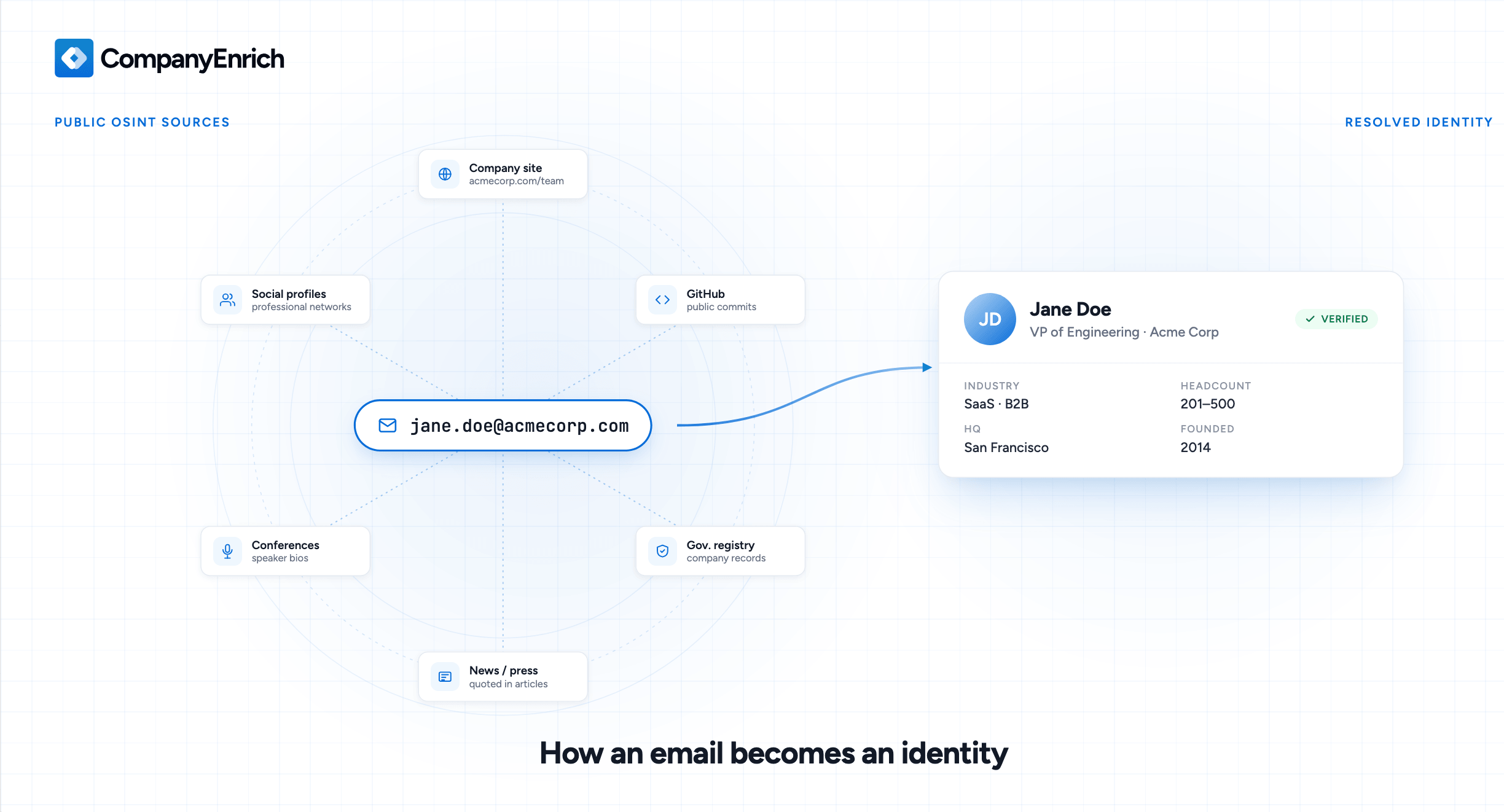
A reverse email lookup answers all three questions. You send it the email, it sends back the person behind it and the company they work at: name, job title, LinkedIn, location, company domain, headcount, industry, headquarters. The full identity graph, in about a second. It's the tool you use when you need to find a company from an email, do an email to person lookup, or turn a raw signup into a qualified lead.
This post covers how these email to person lookup tools actually work, where they break (and they do break), what to look for when you're picking one, and how the landscape is shifting now that AI agents are calling them directly. If you're evaluating providers, integrating one into a product, or just trying to figure out whether the accuracy claims on vendor sites are real, this should give you enough to decide.
How it works under the hood
Reverse email lookup is a specific application of something broader called OSINT: Open Source Intelligence. OSINT is the practice of gathering information from publicly available sources like websites, social media, public records, and archives, without hacking, scraping private data, or buying stolen credentials. Security researchers, journalists, fraud investigators, and B2B data providers all use OSINT techniques. Reverse email lookup is OSINT applied specifically to an email address, automated and packaged so you can run it at scale.
Underneath the surface, any lookup uses a handful of techniques running together.
Domain parsing
Split jane@acmecorp.com at the @ and you instantly know which company the person works at, assuming it's a corporate domain. From there you can pull firmographic data from corporate registries, the company's own website, and public business databases. The domain alone gets you a surprising amount, which is why B2B reverse lookup works well for work emails and struggles with personal addresses like Gmail or Yahoo where there's no company to parse out.
Cross-referencing public profiles
People reuse their work email across professional platforms, and each platform an email appears on is a thread back to the person behind it. LinkedIn, company About pages, GitHub, Twitter, conference speaker bios, public directories. All public data, just spread across thousands of sources.
The basic technique is to extract identifiable pieces from the email (the name, the username, the domain) and search for them on specific platforms. For jane.doe@acmecorp.com, that might look like:
site:linkedin.com/in "jane doe" acmecorpsite:github.com "jane.doe" OR "janedoe""jane.doe@acmecorp.com"in quotes to find any page that published the full email
Chain enough of these searches together and you've got a full identity: LinkedIn profile, job history, GitHub activity, maybe a conference talk or podcast appearance. This is the layer that turns a bare email into an actual person.
Historical presence and breach data
The third method looks backward. Reverse lookup tools may check the target email against known historical data breaches, not to retrieve sensitive information like passwords or credit card numbers, but to confirm that the email existed and was used somewhere. An email listed in a leaked forum signup from 2017 is proof that the account existed and was in use that year. Chain a few of these together and you've got a timeline of the subject's digital history.
This sounds legally sketchy until you look at how it's actually done. Ethical reverse lookup tools never download, store, or distribute the breached databases themselves. They query established breach-tracking indexes like Have I Been Pwned in real time, retrieving only metadata (did this email appear in this breach? yes or no) without exposing any of the leaked contents. That pattern keeps the method compliant with GDPR, CCPA, and most modern privacy frameworks.
Single-source vs waterfall: the architecture choice
Not all reverse email lookup services work the same way under the hood. There are two main architectures, and the one you pick has real consequences for speed, coverage, and cost.
Single-source APIs
A single-source API runs against one proprietary dataset. The provider has their own data (crawled, licensed, or built in-house), you query it, you get an answer back. Fast, usually 300 to 400 milliseconds, predictable pricing, simple to integrate.
The limit is coverage. No single provider has everyone. Data coverage depends on what they've crawled, which regions they focus on, and how recently they refreshed. Most single-source APIs hit a ceiling somewhere between 60% and 85% match rate on real-world B2B lists. People who recently changed jobs, people in underrepresented regions, and people with privacy-heavy digital footprints are the ones who fall through.
Waterfall APIs
A waterfall API queries multiple underlying data sources in sequence. If the first provider can't resolve the email, the request falls through to the second, then the third, until something matches. CompanyEnrich is the best-known example in this space.
The upside is coverage. Stacking providers catches the people any single dataset misses.
The downsides are latency and cost. Each fallback adds response time, so a waterfall call can take 1 to 5 seconds depending on how deep it has to go. You're also paying multiple providers for the same lookup, which adds up fast at volume.
Why this matters: coverage is fragmented
Here's the part vendors don't usually talk about: no provider has full coverage of the B2B contact universe. Data sources pull from different places and specialize in different regions, so each provider finds a different subset of people.
This was quantified in a recent benchmark run by Georgios Giatsidis, a B2B sales expert who tested four reverse email lookup tools against the same list of 742 contacts. The full test is on LinkedIn. The headline finding from the test:
- Only 24 emails were found by all four tools tested
- 241 emails were found by only one tool
- CompanyEnrich and Datagma together covered 83% of the list, vs 61% alone
The practical takeaway is this: if you're at low volume or early in building a product, a single good single-source API is usually enough. If you're running enrichment at real scale and every missed contact matters, stacking two providers with different data sources gets you higher coverage than any one of them alone. Waterfall architectures exist for exactly this reason, but you can also build your own stack by calling two single-source APIs in sequence and falling back yourself.
What you can actually do with it
Reverse email lookup is a primitive. The interesting part is what you build on top of it. Four use cases cover most of what teams actually do with this data.
Turn one form field into a full lead
Every extra field on a signup form costs you conversions. HubSpot analyzed 40,000 forms and found conversion rates drop measurably with every additional field, with reducing forms from 4 fields to 3 boosting conversions by nearly 50%. Ask for just an email, and you lose almost no one, but you also learn almost nothing about who just signed up.
Finding company from email fixes this. You show a single "work email" field on your form. The moment someone submits, the backend fires a lookup and enriches the record with name, title, company, size, industry, and location before the lead even hits your CRM. The user sees a frictionless form. Your sales team sees a fully qualified lead. The technique has a name: progressive profiling, done invisibly.
This is probably the single highest-ROI use case of reverse email lookup. Every B2B SaaS company running a freemium or trial signup flow is leaving leads on the table without it.
Route and prioritize leads automatically
Once the lead has a full profile, routing becomes a solved problem. A lookup that returns "Director of Engineering, 5,000-employee fintech" goes to enterprise. "Solo founder, 1-person company, gmail address" goes to the self-serve nurture track.
You can wire this up entirely in your CRM or signup backend. No manual SDR triage, no round-robin assignment that puts enterprise leads in front of junior reps, no leads sitting in a queue for three days. The data that comes back from the lookup drives the rules.
The CRM enrichment side of this is the same logic applied to your existing contact base. You scroll through your database, fire a lookup on every stale email, and refresh the records. Teams running this on a schedule (weekly, monthly) keep their CRM from rotting the way most B2B databases do.
Detect fraud and synthetic identities at signup
Fraud teams use the same API for the opposite reason. A legitimate professional email resolves to a real person with a LinkedIn profile, a company, and a digital footprint going back years. A fraudulent signup resolves to nothing: no social profiles, a domain registered last week, no historical presence anywhere on the web.
The absence of data is the signal. A blank profile with no linked social accounts and no historical footprint is a strong indicator something's off. You can then route that signup into a higher-friction verification path (manual review, secondary KYC, email confirmation loops) while legitimate users pass straight through.
This matters most in fintech, crypto, and any high-stakes signup flow where synthetic identities and account takeovers are a real threat. The technique lets you stay low-friction for real users and raise the bar only for the suspicious ones.
Power AI agents and autonomous workflows
An AI sales agent gets a new lead email at 2 AM. It runs a reverse lookup, sees the prospect is a VP of Engineering at a 500-person SaaS company, pulls the company's latest funding news, drafts a personalized outreach message, and queues it for human review by 9 AM. None of this works without an email lookup tool the agent can call on its own.
This is the newest use case and the fastest-growing one. Research agents, support agents, enrichment agents, outbound agents: they all need the same primitive, which is turning a partial input (an email) into structured context (who and where) in one call. That's exactly what reverse email lookup does.
The integration surface matters here. Agents work best when tools are exposed through MCP (Model Context Protocol), the emerging standard that lets AI models discover and call external tools without custom glue code. Providers shipping an MCP server alongside their REST API make it trivial to plug reverse email lookup into an agent workflow. Providers that only expose REST force you to wire it up manually.
The limitations nobody talks about
Vendor marketing makes reverse email lookup sound deterministic. You send an email, you get a person back. In practice there are limitations that every serious buyer runs into, and understanding them upfront saves you from picking the wrong provider or building on false expectations.
B2B data decays faster than you think
Contact data is tied to employment, and employment changes constantly. People leave jobs, get promoted, change titles, get laid off. Research from MarketingSherpa puts B2B contact data decay at roughly 2.1% per month, which compounds to about 22.5% annually. Over a year, that's a quarter of your CRM quietly going stale. In tech sectors with heavy turnover, the annual decay rate climbs higher: Bureau of Labor Statistics data shows the average tenure at a company has dropped to around 4 years, and in tech it's often 2 to 3.
Reverse email lookup helps you fight this, but only if you run it on a schedule. A lookup you ran 18 months ago is probably wrong now. Teams that treat enrichment as a one-time event (run it once, load the CRM, move on) end up with the same decaying data they started with. The ones who keep their data current run refresh cycles (weekly, monthly, quarterly depending on scale) and re-enrich stale records as part of normal operations.
Personal email addresses are a different problem
Everything this post has described works well for corporate emails. Domains parse cleanly, firmographic data is attached, LinkedIn and GitHub are searchable. Hand a reverse lookup tool jane@gmail.com and the match rate collapses.
The reason is structural. Gmail, Yahoo, iCloud, ProtonMail and other personal providers don't attach firmographic data to accounts. There's no company to look up. The only way to resolve a personal email to a professional identity is to find that same email listed on a public profile somewhere (a speaker bio, a public GitHub commit, a forum registration), and most people don't do that. Providers that claim high match rates on personal emails are usually stretching the truth or counting partial matches.
Regional coverage is the related trap. Providers optimized for North American data have blind spots in Europe and Latin America, where data privacy norms are stricter and professional footprints are different. If your ICP is European B2B, a US-first provider will underperform, and vice versa.
No single provider has full coverage
This is the one most posts skip. The reality of the reverse lookup market is that no provider catches everyone, and the gap between providers is much bigger than vendor sites suggest.
Georgios Giatsidis' 742-contact benchmark across four tools found:
- Only 24 emails (3.2%) were found by all four providers
- 241 emails were found by exactly one provider, and only that provider
- Hit rates ranged from 9.4% (People Data Labs) to 61.3% (CompanyEnrich) on the same list
The best single provider in the test found 61% of the list. That's the ceiling, not the average. If you go in expecting 90% match rates because that's what a vendor site advertised, you will be disappointed. The "90% accuracy" number most vendors publish is their accuracy when they return a result, not the percentage of emails they resolve, and it's easy to conflate the two when reading a vendor landing page.
What to look for when evaluating a provider
Every vendor site claims high accuracy, fast API, great coverage, and developer-friendly docs. If you take those claims at face value, you'll pick wrong. Here's what to actually check.
Hit rate vs accuracy (and why they get conflated)
These are two different numbers and every buyer should know the difference.
Hit rate is the percentage of emails the provider actually returns a result for. If you send 1,000 emails and get 600 back with data, hit rate is 60%.
Accuracy is how often the returned data is correct, measured only against the emails the provider resolved. If 600 came back and 540 were right, accuracy is 90%.
A provider can have 95% accuracy and 10% hit rate: their data is almost always right, but they only resolve one in ten emails you send. On paper that sounds impressive. In production it's useless.
Georgios Giatsidis' benchmark on 742 contacts showed how wide the gap between these metrics can be across providers:
| Provider | Hit rate | Accuracy | Unique finds |
|---|---|---|---|
| CompanyEnrich | 61.3% | 91.2% | 138 |
| Datagma | 57.7% | 84.1% | 96 |
| Snov | 38.7% | 89.7% | 44 |
| People Data Labs | 9.4% | 85.4% | 5 |
Accuracy above 84% for all four tools. Hit rate swinging from 9.4% to 61.3%. When vendors publish a single accuracy number without the hit rate next to it, that's the tell. Always ask for both.
Unique finds and data source differentiation
If every provider queried the same underlying data, stacking two of them would be pointless. They don't, and the differences are bigger than most buyers realize. The unique finds column in the table above shows how differently each provider's dataset is shaped: 138 profiles only CompanyEnrich resolved, 96 only Datagma, and so on.
If you're evaluating a provider, ask where their data comes from. Public web crawling? Licensed datasets? User contributions? Social platform partnerships? The answer tells you which segments of the contact universe they'll cover well and which they'll miss entirely.
Latency and response format
For synchronous use cases like form enrichment or fraud detection at signup, latency matters. Above 1 second and you start seeing form abandonment and timeouts. Test with a small batch of real emails before committing.
Response format matters too. A clean, consistent JSON schema saves you days of integration work. Payloads with nested inconsistencies (fields that appear for some records and not others, or change shape between calls) turn a one-day integration into a two-week project. Read the docs before you sign.
Developer experience and integration surface
Check how you can actually call the API. REST is the baseline. Some providers also offer MCP servers (for AI agents), webhooks (for async enrichment), batch endpoints (for bulk processing), and scroll or pagination APIs (for large result sets). If you're building anything beyond a single synchronous lookup, these matter.
Good signs: clear docs, realistic response examples, no-friction API key signup, working code samples in the languages you use. Bad signs: docs that require a sales call, "request access" gating on basic features, examples that don't match what the API actually returns.
Compliance posture
This one gets underweighted until it matters, then it matters a lot. Ask where the provider's data comes from and how they handle GDPR, CCPA, and OSINT ethics. Providers that scrape private data, buy from breached sources, or operate in regulatory grey zones are liabilities your legal team will eventually find.
The market has already had one high-profile example of this going wrong. Proxycurl shut down in 2025 after legal action from LinkedIn. Providers that position themselves around "we scrape LinkedIn" should be treated with serious caution. Clean OSINT sourcing (public web, public records, compliant licensing) is the baseline to expect.
Pricing model
Every provider prices differently: credit-based, per-call, flat-rate, tiered, waterfall pay-for-success. The cheapest sticker price is rarely the cheapest in production. What to actually check: cost per successful resolution (not per call), overage pricing, whether unresolved emails consume credits, and whether features like webhooks or MCP access are gated behind higher tiers.
Pay-for-success waterfall pricing can get expensive fast at high match rates. Flat credit-based pricing is easier to budget against. Try both on real workloads before locking in.
Compliance and the GDPR angle
Reverse email lookup sits on top of personal data. Names, job titles, employers, locations, social profiles. Under GDPR, CCPA, and most modern privacy frameworks, every piece of that is regulated. Ignoring this part of the evaluation isn't just a legal risk for the provider. It's a risk for you as a buyer, because you inherit their data practices the moment you start using their API.
How reverse lookup stays legal
The legal foundation for B2B enrichment in Europe and most other regions is legitimate interest. Under GDPR, you can process personal data without explicit consent if you have a legitimate business reason, the data subject would reasonably expect it, and your use doesn't override their rights. Contacting someone at their work email about a product that's relevant to their job generally clears this bar. Spamming a personal Gmail with unrelated offers does not.
The data sourcing side also has to stay clean. Everything a legitimate reverse lookup returns should come from OSINT: publicly available sources like corporate websites, public social profiles, news articles, company registries, and public records. Data from breached databases, scraped private accounts, or illegally obtained sources is not usable, no matter how good it is. Reputable providers filter this out at the source.
What to ask a provider about compliance
Three questions will separate compliant providers from liabilities.
Where does the data come from? The answer should be specific: public web, corporate sites, social platforms, government records. "Proprietary sources" without detail is a red flag.
Do they offer a Data Processing Agreement? If you're handling EU or UK data at any real volume, you need a DPA in place. Providers that don't offer one are not usable for serious enterprise work. Some providers gate DPAs behind higher-tier plans, which is worth checking before you commit.
Where is the data stored? For EU customers, data residency matters. Providers hosting in US-only infrastructure can create compliance headaches under GDPR's cross-border transfer rules. European hosting (Frankfurt, Amsterdam, Dublin are common) simplifies this.
Reverse email lookup tools worth looking at
All of the tools below offer reverse email lookup through an API. They differ in data sourcing, coverage, pricing model, and fit. Honest positioning for each:
People Data Labs is a large-scale B2B data provider whose data sits underneath many other tools. PDL is a serious provider for teams building at high volume, though the benchmark performance from Georgios' test showed a 9.4% hit rate on his specific list, which is worth keeping in mind when evaluating on your own data.
CompanyEnrich is where we sit. Purpose-built API for company and people data, 30M+ companies and 170M+ professional profiles, clean REST and MCP server for AI agents. Single-source architecture with a dataset built from the public web, social profiles, company sites, and government records. Best fit for developers and GTM teams building enrichment into products, AI agents, or automated workflows, especially where data coverage on harder-to-find companies matters.
Epieos leans more into OSINT and investigation use cases than pure B2B sales enrichment. If you're doing security research, fraud investigation, or due diligence, Epieos covers more of the non-LinkedIn surface (social platforms, forums, public records). Best fit for investigative and security use cases.
ReverseContact is one of the most focused tools in the category. Takes an email and returns LinkedIn profile data for the person. Clean API, straightforward pricing, minimal scope. Best fit if you need LinkedIn-centric enrichment and nothing else.
Icypeas is European-focused with a strong GDPR and data residency posture. Good coverage on European B2B contacts, which is where a lot of US-first tools underperform. Best fit if your ICP is European and compliance is a first-class concern.
FullEnrich is the best-known waterfall enrichment tool. It queries multiple underlying data providers in sequence and returns the first match, trading latency for coverage. Best fit if you have budget for multi-provider pricing and need maximum hit rate on a list.
Datagma is a solid mid-market reverse lookup provider with decent coverage. In Georgios' benchmark it came in second on hit rate (57.7%) and produced 96 unique finds that other tools missed, making it a strong candidate to pair with another provider for stacked coverage.
Snov is a broader sales engagement platform that includes reverse lookup alongside email finding and outreach automation. Lower hit rate in the benchmark (38.7%) but high accuracy (89.7%). Best fit if you're already using Snov for outbound and want lookup in the same tool.
A note on building your own waterfall
If you want higher coverage than any single provider delivers, you don't have to pay for a waterfall tool. Platforms like Clay and Databar let you chain multiple reverse lookup APIs together in a single workflow. Send an email to provider A, fall back to provider B if nothing comes back, enrich further with provider C. You control the logic, the fallback order, and the cost. Most teams running serious enrichment at scale end up building something like this, either inside a tool like Clay or directly in their own backend code.
Wrapping up
Reverse email lookup is one of those primitives that sounds simple until you actually build on top of it. An email goes in, a person and company come out. But the gap between a vendor's landing page and what actually happens in production is wide, and most of this post has been about closing that gap.
The short version of what matters:
Coverage is fragmented, and vendor accuracy claims hide this. No single provider has everyone. The best tools in real-world benchmarks resolve about 60% of a typical B2B list, not the 90%+ that vendor sites imply. Always ask for hit rate and accuracy separately, not just the flattering one.
Limitations are real and structural. B2B data decays at around 2% per month. Personal emails resolve poorly. Catch-all domains break verification. These aren't edge cases, they're the default. Any provider that claims otherwise is overselling.
Compliance and integration surface are the things that bite you later. Where the data comes from, whether the provider offers a DPA, and whether the API is exposed through MCP for agent workflows all matter more than they seem on day one.
Where to go next
If you want to test a reverse email lookup API on your own data before committing to anything, CompanyEnrich has a free reverse lookup tool you can try without signing up, and the API docs cover the full response schema, rate limits, and MCP access.
If you're evaluating providers seriously, run the same list of 100 to 200 real emails across two or three tools and compare hit rate, accuracy, and unique finds yourself. Georgios Giatsidis' benchmark methodology is a good template. Vendor claims are a starting point, not a conclusion.


Written by Amir, co-founder and CEO of CompanyEnrich. He has 10+ years of experience in B2B SaaS and data infrastructure, and previously founded and exited two B2B SaaS startups before starting CompanyEnrich. He now helps enterprises and startups integrate B2B intelligence into AI agents, workflows, and GTM operations.
Connect on LinkedIn